springmvc文件上传下载
本文围绕SpringMVC文件上传下载展开。文件上传需表单满足特定条件,SpringMVC通过MultipartResolver支持,解析为MultipartFile对象。文件下载分客户端请求和服务端返回两步。中文文件名下载要考虑浏览器编码兼容。还给出创建项目、配置文件、编写代码及测试的示例。
文章信息
- 原文链接:https://jiayq.blog.csdn.net/article/details/88699436
- 发布时间:2019-03-20 20:53:44
- 阅读量:526
- 分类:java同时被 3 个专栏收录, 订阅专栏, springMVC
- 标签:#springmvc文件上传下载, #springmvc中文文件的上传下载, #springmvc一次性上传多个文件, #springmvc如何用原生文件解析器实现文件上传下载, #springmvc原生文件解析器如何使用
摘要
文章浏览阅读526次。本文围绕SpringMVC文件上传下载展开。文件上传需表单满足特定条件,SpringMVC通过MultipartResolver支持,解析为MultipartFile对象。文件下载分客户端请求和服务端返回两步。中文文件名下载要考虑浏览器编码兼容。还给出创建项目、配置文件、编写代码及测试的示例。
springmvc文件上传下载
- 1.文件上传
- 2.文件下载
- 3.中文文件名的文件下载
- 4.例子
- 4.1创建一个springmvc项目
- 4.2导入jar包
- 4.3配置web.xml
- 4.4配置springmvc-config.xml
- 4.5编写controller
- 4.6编写枚举
- 4.7编写jsp
- 4.8发布测试
- 4.1创建一个springmvc项目
1.文件上传
多数文件上传都是通过表单形式提交给后台服务器的,所以文件上传就必须提供表单实现。
表单必须满足的条件:
- 1.表单的method必须为post
- 2.表单的enctype必须为multipart/form-data
3.有文件选择的input控件
在H5中input控件可以添加multiple属性,值为multiple,用来支持多文件同时上传。
当浏览器的表单的enctype属性为multipart/form-data时,浏览器就会采用二进制流的方式处理表单数据,然后服务端对文件上传的请求进行解析处理。
springMVC对文件上传提供直接的支持,通过MultipartResolver(多部件解析器)对象实现的。
MultipartReslver是一个接口对象,只需要在配置文件中声明bean即可使用。1 2 3 4 5
<bean id="multipartResolver" class="org.springframework.web.multipart.commons.CommonsMultipartResolver"> <!-- 设置请求编码格式 --> <property name="defaultEncoding" value="utf-8"></property> </bean>
可配置的属性:
1
2
3
4
defaultEncoding:默认的请求编码方式
maxUploadSize:设置允许文件上传的最大值(字节为单位)
maxInMemorySize:临时缓存文件的最大尺寸
resolverLazily:推迟文件解析,方便在Controller中捕获文件大小异常
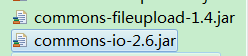
要使用文件上传功能就需要使用这两个jar:
服务端解析:
1
2
3
4
5
6
@RequestMapping("/upFile")
	public String upFile(@RequestParam("upfile") List<MultipartFile> upFiles,
			HttpServletRequest request) {
		//其他操作
		return "first";
	}
使用解析器会自动把文件的二进制流解析为一个MultipartFile的对象。
常用的MultipartFile方法:
1
2
3
4
5
6
7
8
byte[] getBytes()//以字节数组的形式返回文件内容
String getContentType()//返回文件的类型(.mp4|.mp3|.png|...)
InputStream getInputStream()//读取文件内容,返回流对象
String getName()//获取form 表单的参数名称(不是文件名,是表单里选择文件的input的控件名)
String getOriginalFilename()//获取上传文件的初始化名(上传文件时,选择文件窗口选中时的文件的名字--客户端发送给服务端的名字)
long getSize()//获取上传文件的大小,单位字节
boolean isEmpty()//判断上传文件是否为空
void transferTo(File file)//把上传文件保存到指定目录下
2.文件下载
文件下载需要两个步骤:
1.在客户端访问下载的请求:指定服务器中资源,可以是文件全路径,文件相对路径,文件名等等
2.在服务端使用ResponseEntity类型的对象进行返回HttpHeaders和HttpStatus对象,通知客户端接收数据,然后就会完成文件的下载了。
3.中文文件名的文件下载
因为每一个浏览器的编码方式不同,造成中文文件就需要对不同的浏览器做兼容:
核心思想:
客户端用指定的编码方式传输数据,在服务端用相同的编码方式解析文件信息。
在下载的第二个步骤中,用各个浏览器的编码方式设置转码后的文件名,这样下载到本地就是中文文件名的文件了。
4.例子
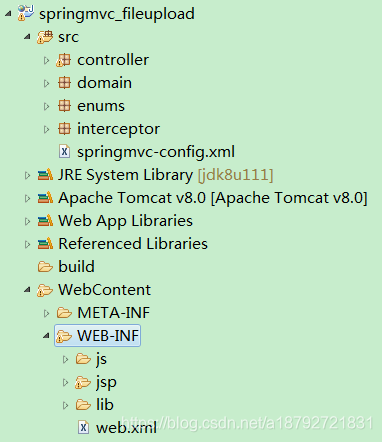
4.1创建一个springmvc项目
4.2导入jar包
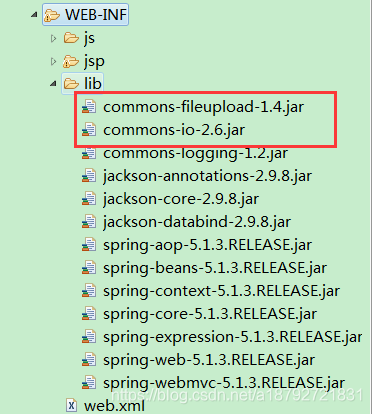
4.3配置web.xml
web.xml
1
2
3
4
5
6
7
8
9
10
11
12
13
14
15
16
17
18
19
20
21
22
<?xml version="1.0" encoding="UTF-8"?>
<web-app xmlns="http://java.sun.com/xml/ns/javaee"
	xmlns:xsi="http://www.w3.org/2001/XMLSchema-instance"
	xsi:schemaLocation="http://java.sun.com/xml/ns/javaee
	http://java.sun.com/xml/ns/javaee/web-app.xsd">
	<servlet>
		<!-- 配置前端过滤器 -->
		<servlet-name>springmvc</servlet-name>
		<servlet-class>org.springframework.web.servlet.DispatcherServlet</servlet-class>
		<!-- 初始化时加载配置文件 -->
		<init-param>
			<param-name>contextConfigLocation</param-name>
			<param-value>classpath:springmvc-config.xml</param-value>
		</init-param>
		<!-- 容器启动时加载servlet -->
		<load-on-startup>1</load-on-startup>
	</servlet>
	<servlet-mapping>
		<servlet-name>springmvc</servlet-name>
		<url-pattern>/</url-pattern>
	</servlet-mapping>
</web-app>
4.4配置springmvc-config.xml
springmvc-config.xml
1
2
3
4
5
6
7
8
9
10
11
12
13
14
15
16
17
18
19
20
21
22
23
24
25
26
27
28
29
30
31
32
33
34
<?xml version="1.0" encoding="UTF-8"?>
<beans xmlns="http://www.springframework.org/schema/beans"
	xmlns:xsi="http://www.w3.org/2001/XMLSchema-instance"
	xmlns:context="http://www.springframework.org/schema/context"
	xmlns:mvc="http://www.springframework.org/schema/mvc"
	xsi:schemaLocation="http://www.springframework.org/schema/beans
	http://www.springframework.org/schema/beans/spring-beans.xsd
	http://www.springframework.org/schema/context
	http://www.springframework.org/schema/context/spring-context.xsd
	http://www.springframework.org/schema/mvc
	http://www.springframework.org/schema/mvc/spring-mvc.xsd
	">
	<!-- 指定需要扫描的包 -->
	<context:component-scan base-package="controller"></context:component-scan>
	<!-- 定义视图解析器 -->
	<bean id="viewResolver"
		class="org.springframework.web.servlet.view.InternalResourceViewResolver">
		<!-- 设定前缀 -->
		<property name="prefix" value="/WEB-INF/jsp/"></property>
		<!-- 设定后缀 -->
		<property name="suffix" value=".jsp"></property>
	</bean>
	<!-- json的转换器注解模式 -->
	<mvc:annotation-driven></mvc:annotation-driven>
 	<!-- 静态资源访问映射 -->
	<mvc:resources location="/WEB-INF/js/" mapping="/js/**"></mvc:resources>
	<!-- 文件上传解析器 -->
	<bean id="multipartResolver"
		class="org.springframework.web.multipart.commons.CommonsMultipartResolver">
		<!-- 设置请求编码格式 -->
		<property name="defaultEncoding" value="utf-8"></property>

	</bean>
</beans>
4.5编写controller
1
2
3
4
5
6
7
8
9
10
11
12
13
14
15
16
17
18
19
20
21
22
23
24
25
26
27
28
29
30
31
32
33
34
35
36
37
38
39
40
41
42
43
44
45
46
47
48
49
50
51
52
53
54
55
56
57
58
59
60
61
62
63
64
65
66
67
68
69
70
71
72
73
74
75
76
77
78
79
80
81
82
83
84
85
86
87
88
89
90
91
92
93
94
95
96
97
98
99
100
101
102
103
104
105
106
107
108
109
110
111
112
113
114
115
116
117
118
119
package controller;

import java.io.File;
import java.io.IOException;
import java.io.UnsupportedEncodingException;
import java.net.URLEncoder;
import java.util.HashMap;
import java.util.List;
import java.util.Map;
import java.util.UUID;

import javax.servlet.http.HttpServletRequest;

import org.apache.commons.io.FileUtils;
import org.springframework.http.HttpHeaders;
import org.springframework.http.HttpStatus;
import org.springframework.http.MediaType;
import org.springframework.http.ResponseEntity;
import org.springframework.stereotype.Controller;
import org.springframework.web.bind.annotation.RequestMapping;
import org.springframework.web.bind.annotation.RequestParam;
import org.springframework.web.multipart.MultipartFile;

import enums.FileMessage;


@Controller
@RequestMapping("/file")
public class FileController {

	@RequestMapping("/upFile")
	public String upFile(@RequestParam("upfile") List<MultipartFile> upFiles,
			HttpServletRequest request) {
		if(!upFiles.isEmpty() && upFiles.size() > 0){
			for(MultipartFile file : upFiles){
				String fileName = file.getOriginalFilename();
				String dirPath = request.getServletContext().getRealPath("WEB-INF/up/");
				File fl = new File(dirPath);
				if(fl.exists()){
					fl.mkdirs();
				}
				String savingName = UUID.randomUUID()+"_"+fileName;
				try{
					file.transferTo(new File(dirPath+savingName));
				} catch(Exception e){
					request.setAttribute(FileMessage.MESSAGE.toString(), e.getMessage());
					return "first";
				}
				request.setAttribute(FileMessage.MESSAGE.toString(), request.getAttribute("message")+dirPath+savingName);
			}
		}
		return "first";
	}

	@RequestMapping("/getFileList")
	public String getFileList(HttpServletRequest request){
		//下载文件夹路径
		String updir = request.getServletContext().getRealPath("WEB-INF/up/");
		//获取文件夹对象
		File file = new File(updir);
		//获取文件夹内所有的文件对象
		File[] fileList = file.listFiles();
		if(fileList.length <= 0){
			//没有文件提示
			request.setAttribute(FileMessage.MESSAGE.toString(), "have no file!");
			return "fileList";
		}
		//创建返回列表载体文件名-文件真实路径(实际中不建议,这样会暴露服务器的文件结构(建议使用相对路径))
		Map<String, String> resultMap = new HashMap<>();
		for(File f : fileList){
			//获取文件名
			String fileName = f.getName();
			//获取真实的文件名(去除UUID)
			fileName = fileName.split("_")[1];
			String filePath = f.getPath();
			resultMap.put(fileName, filePath);
		}
		request.setAttribute(FileMessage.FILELIST.toString(), resultMap);
		return "fileList";
	}

	@RequestMapping("/load")
	public ResponseEntity<byte[]> loadFile(
			@RequestParam("filepath") String filePath,HttpServletRequest request) throws IOException {
		// 创建下载文件对象
		File file = new File(filePath);
		// 创建相应头
		HttpHeaders headers = new HttpHeaders();
		// 通知浏览器以下载的方式打开文件
		headers.setContentDispositionFormData("attachment",
				encodingFileName(request, file.getName().split("_")[1]));
		// 定义以流的形式下载返回文件数据
		headers.setContentType(MediaType.APPLICATION_OCTET_STREAM);
		// 使用spring mvc框架的ResponseEntity对象封装返回下载数据
		return new ResponseEntity<byte[]>(FileUtils.readFileToByteArray(file),
				headers, HttpStatus.OK);
	}

	private String encodingFileName(HttpServletRequest request, String name)
			throws UnsupportedEncodingException {
		//兼容IE
		String[] IEBrowserKeyWords = {"MSIE","Trident","Edge"};
		//获取请求头信息
		String userAgent = request.getHeader("User-Agent");
		for(String key : IEBrowserKeyWords){
			if(userAgent.contains(key)){
				//IE内核,统一设置为utf-8
				return URLEncoder.encode(name, "utf-8");
			}
		}
		return new String(name.getBytes("utf-8"),"ISO-8859-1");
	}

	@RequestMapping("/toFile")
	public String toFile(){
		return "fileup";
	}

}
4.6编写枚举
1
2
3
4
5
6
7
8
9
10
11
12
13
14
15
16
17
18
19
package enums;

public enum FileMessage {

	MESSAGE("message"),
	FILELIST("fileList");

	private String key;

	private FileMessage(String key){
		this.key = key;
	}

	@Override
	public String toString(){
		return this.key;
	}

}
4.7编写jsp
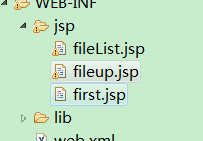
fileList.jsp
1
2
3
4
5
6
7
8
9
10
11
12
13
14
15
16
17
18
19
20
21
22
23
24
25
26
27
28
29
30
31
32
33
34
35
36
37
38
39
40
41
42
43
44
45
46
47
48
49
50
<%@page import="java.util.Set"%>
<%@page import="java.io.File"%>
<%@page import="java.util.Map"%>
<%@page import="enums.FileMessage" %>
<%@page import="java.net.URLEncoder" %>
<%@ page language="java" contentType="text/html; charset=utf-8"
    pageEncoding="utf-8"%>
<!DOCTYPE html PUBLIC "-//W3C//DTD HTML 4.01 Transitional//EN" "http://www.w3.org/TR/html4/loose.dtd">
<html>
<head>
<meta http-equiv="Content-Type" content="text/html; charset=utf-8">
<title>File List</title>
</head>
<body>
	<%	String message = (String)request.getAttribute(FileMessage.MESSAGE.toString());
		if(message != null && message.length() > 0){%>
			${message }
	<%	} else { %>
	<table border="1px">
		<tr>
			<th>
				文件名
			</th>
			<th>
				下载链接
			</th>
		</tr>
		<%	Map<String,String> fileList = (Map)request.getAttribute(FileMessage.FILELIST.toString());
			Set<String> fileName = fileList.keySet();
			for(String name : fileName){%>
		<tr>
			<td>
				<%=name %>
			</td>
			<td>
				<a
				href="${pageContext.request.contextPath }/file/load?filepath=<%=URLEncoder.encode(fileList.get(name), "utf-8") %>">下载<%=name%></a>
			</td>
		</tr>
		<%
			}
		%>

	</table>
	<%
		}
	%>

</body>
</html>
fileup.jsp
1
2
3
4
5
6
7
8
9
10
11
12
13
14
15
<%@ page language="java" contentType="text/html; charset=utf-8"
    pageEncoding="utf-8"%>
<!DOCTYPE html PUBLIC "-//W3C//DTD HTML 4.01 Transitional//EN" "http://www.w3.org/TR/html4/loose.dtd">
<html>
<head>
<meta http-equiv="Content-Type" content="text/html; charset=utf-8">
<title>File up page!</title>
</head>
<body>
	<form action="${pageContext.request.contextPath }/file/upFile" method="post" enctype="multipart/form-data">
		<input type="file" name="upfile" value="select file" multiple="multiple"><br/>
		<input type="submit" value="up">
	</form>
</body>
</html>
first.jsp
1
2
3
4
5
6
7
8
9
10
11
12
<%@ page language="java" contentType="text/html; charset=utf-8"
    pageEncoding="utf-8"%>
<!DOCTYPE html PUBLIC "-//W3C//DTD HTML 4.01 Transitional//EN" "http://www.w3.org/TR/html4/loose.dtd">
<html>
<head>
<meta http-equiv="Content-Type" content="text/html; charset=utf-8">
<title>Hello Spring MVC</title>
</head>
<body>
	${message}
</body>
</html>
4.8发布测试
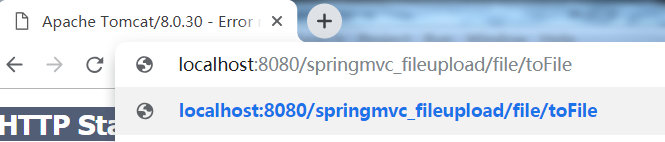
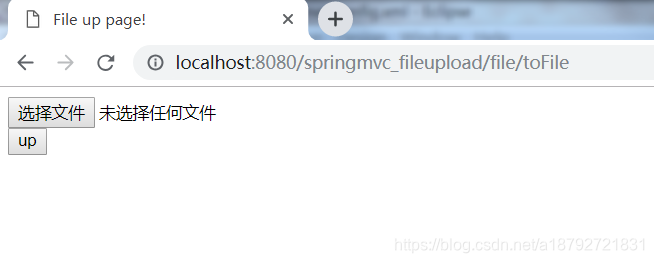
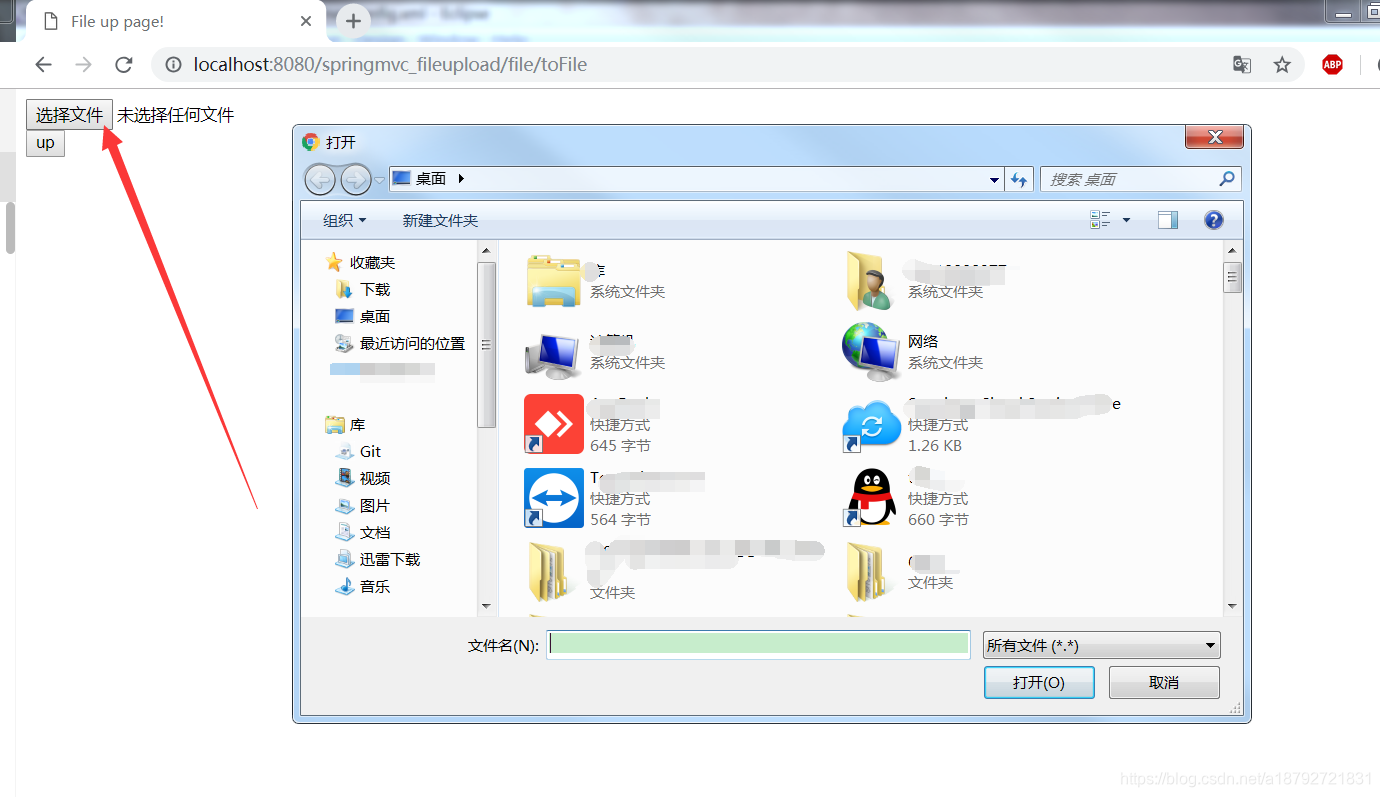
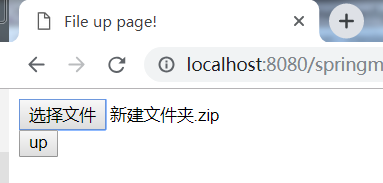
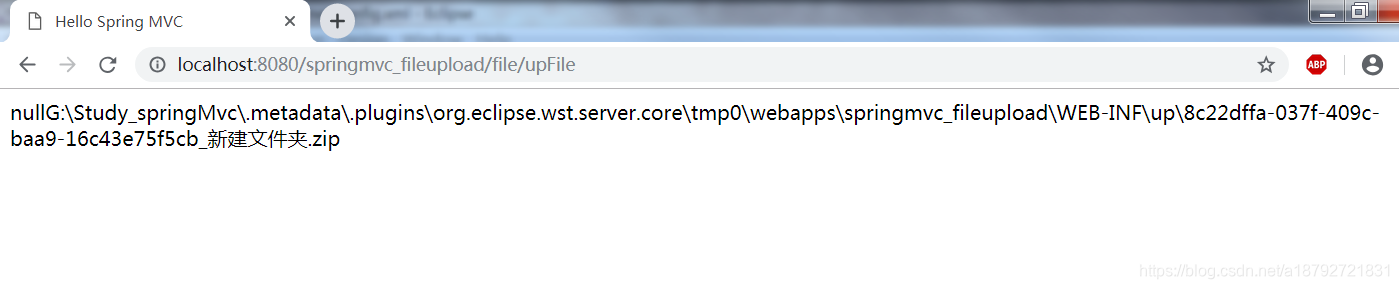
上传1个文件
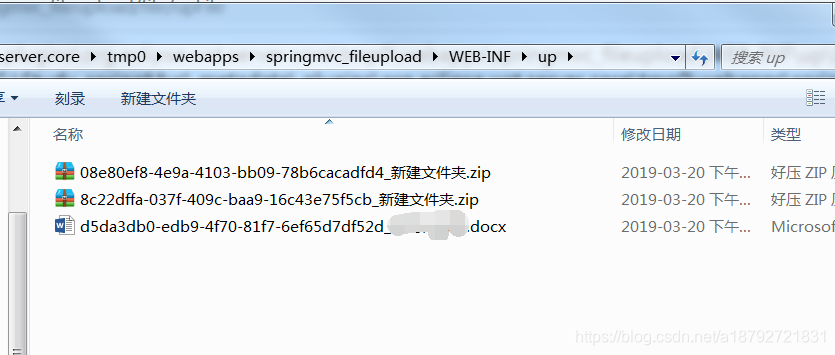
这个就是上传的文件目录:
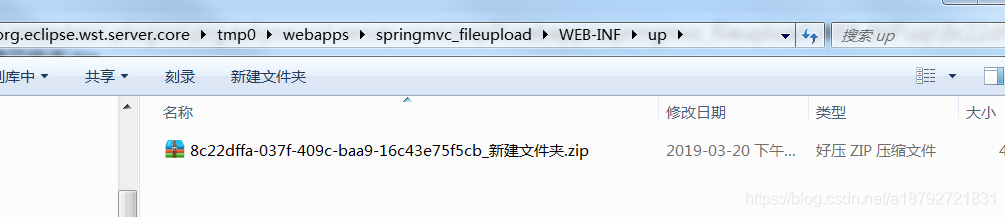
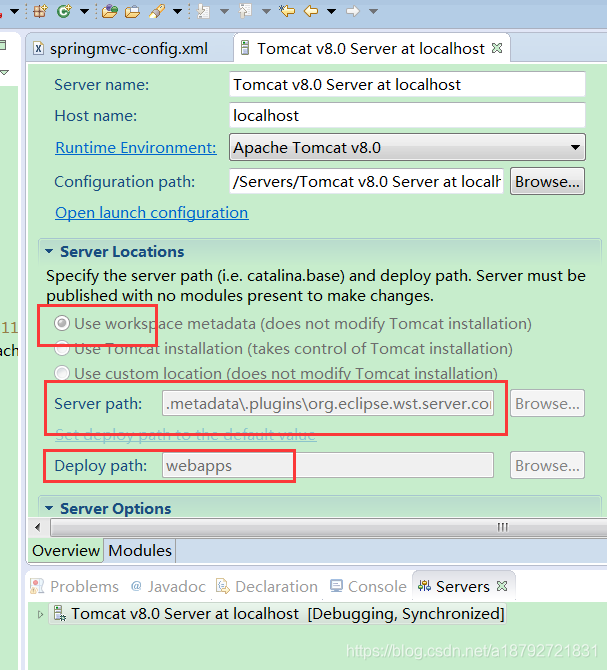
在这里配置项目发布路径
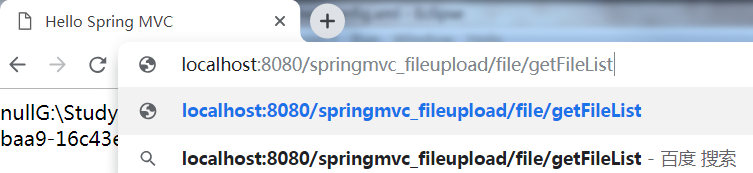
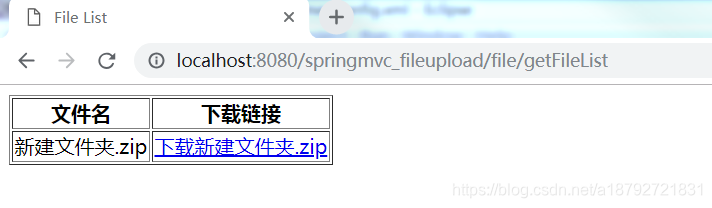
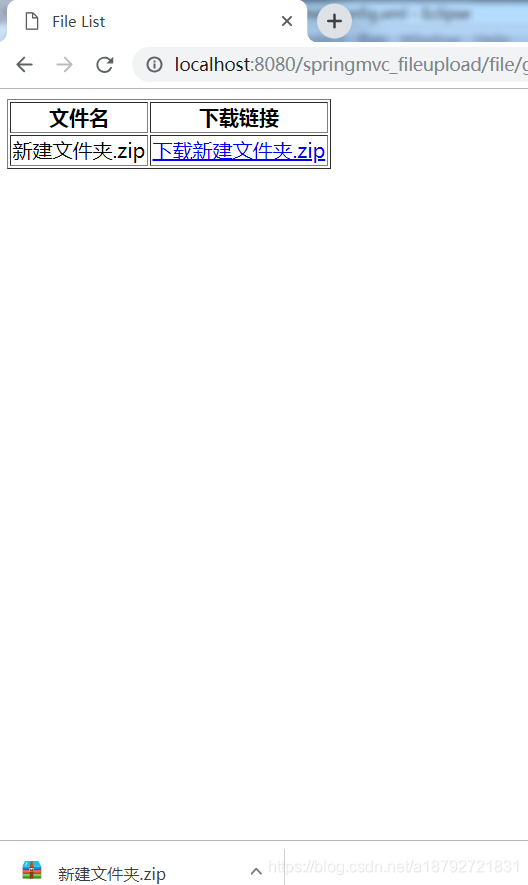
下载:
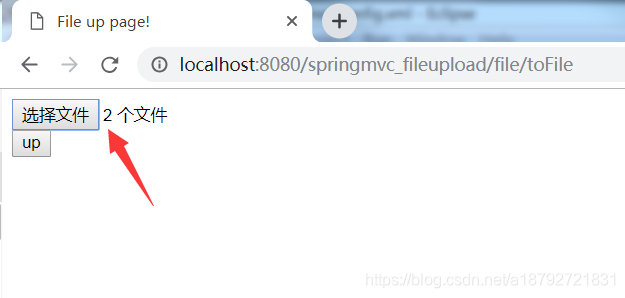
上传多个文件: