spring&mybatis整合--Mapper接口注解配置整合
本文详细介绍了Spring与MyBatis整合的过程,包括工程搭建、数据库配置、实体类创建、日志配置、工具类使用、数据源配置、自定义注解、服务与DAO层实现及测试类编写,展示了如何在Java工程中实现数据库操作。
spring&mybatis整合--Mapper接口注解配置整合
文章信息
- 原文链接:https://jiayq.blog.csdn.net/article/details/88409587
- 发布时间:2019-03-11 20:54:17
- 阅读量:1
- 分类:java同时被 3 个专栏收录, 订阅专栏, spring
- 标签:#spring&mybatis整合, #spring&mybatis整合Mapper接口整合, #spring&mybatis整合Mapper接口整合注解配置方式, #spring&mybatis整合小项目, #快速学会spring&mybatis
摘要
文章浏览阅读1.4k次。本文详细介绍了Spring与MyBatis整合的过程,包括工程搭建、数据库配置、实体类创建、日志配置、工具类使用、数据源配置、自定义注解、服务与DAO层实现及测试类编写,展示了如何在Java工程中实现数据库操作。
spring&mybatis整合–Mapper接口注解配置整合
- 1.创建一个Java工程
- 2.导入jar包
- 3.数据库准备
- 4.创建实体
- 5.创建增强类
- 6.创建日志配置
- 7.创建工具类
- 8.配置数据源
- 9.创建自定义注解
- 10.创建工程配置
- 10.增加服务
- 11.增加Dao
- 12.服务的实现
- 13.Dao的实现
- 14.编写测试类
- 15.运行结果
注意点
1.Mapper接口的名称和对应的Mapper.xml映射文件的名称必须一致;
2.Mapper.xml文件中的namespace与Mapper接口的类路径相同:即接口文件和映射文件需要放在同一个包中;
3.Mapper接口中的方法名和Mapper.xml中定义的每个执行语句的id相同;
4.Mapper接口中方法的输入参数类型要和Mapper.xml中定义的每个sql的parameterType的类型相同;
5.Mapper接口方法的输出参数类型要和Mapper.xml中定义的每个sql的resultType的类型相同
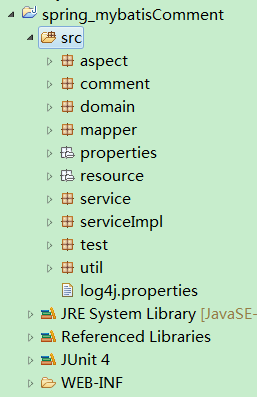
1.创建一个Java工程
2.导入jar包
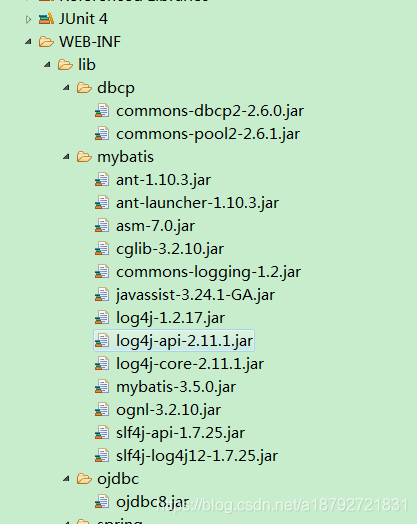
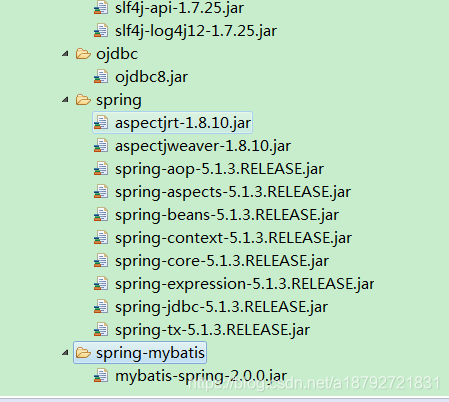
3.数据库准备
1
2
3
4
5
6
7
8
9
10
11
12
13
14
15
16
17
18
19
20
21
22
23
24
25
26
27
28
29
30
31
32
33
34
35
36
37
38
39
40
41
42
43
44
45
46
47
48
49
50
51
52
53
54
55
56
57
58
59
60
61
62
63
64
65
66
67
68
69
70
71
72
73
74
75
76
77
78
79
80
81
82
83
84
85
86
87
88
89
90
91
92
93
94
95
96
97
98
99
100
101
102
103
104
105
106
107
108
109
110
111
112
113
114
115
116
117
118
119
120
121
122
123
124
125
-- Create table
create table PEOPLE
(
  id   NUMBER not null,
  name VARCHAR2(50) not null,
  age  NUMBER not null,
  sex  NUMBER not null
)
tablespace USERS
  pctfree 10
  initrans 1
  maxtrans 255
  storage
  (
    initial 64K
    next 1M
    minextents 1
    maxextents unlimited
  );
-- Add comments to the columns
comment on column PEOPLE.id
  is '人的id,不可为空,不可重复,主键';
comment on column PEOPLE.name
  is '人的姓名,不可为空,最大值50';
comment on column PEOPLE.age
  is '人的年龄,不可为空';
comment on column PEOPLE.sex
  is '人的性别,不可为空';
-- Create/Recreate primary, unique and foreign key constraints
alter table PEOPLE
  add constraint PEOPLE_PK primary key (ID)
  using index
  tablespace USERS
  pctfree 10
  initrans 2
  maxtrans 255
  storage
  (
    initial 64K
    next 1M
    minextents 1
    maxextents unlimited
  );
-- Create/Recreate check constraints
alter table PEOPLE
  add constraint PEOPLE_AGE
  check (age < 150 AND age > 0);
alter table PEOPLE
  add constraint PEOPLE_SEX
  check (sex IN (0,1));


-- Create table
create table SERVER
(
  id     NUMBER not null,
  name   VARCHAR2(50) not null,
  remark VARCHAR2(50)
)
tablespace USERS
  pctfree 10
  initrans 1
  maxtrans 255
  storage
  (
    initial 64K
    next 1M
    minextents 1
    maxextents unlimited
  );
-- Add comments to the table
comment on table SERVER
  is '服务表:存储所有的服务';
-- Add comments to the columns
comment on column SERVER.id
  is '服务的id,不可以为空,主键,不可重复';
comment on column SERVER.name
  is '服务的名称,不可以为空';
comment on column SERVER.remark
  is '服务的说明,可以为空';
-- Create/Recreate primary, unique and foreign key constraints
alter table SERVER
  add constraint SERVICE_PK primary key (ID)
  using index
  tablespace USERS
  pctfree 10
  initrans 2
  maxtrans 255
  storage
  (
    initial 64K
    next 1M
    minextents 1
    maxextents unlimited
  );


-- Create table
create table PEOPLE_SERVER
(
  people_id NUMBER not null,
  server_id NUMBER not null
)
tablespace USERS
  pctfree 10
  initrans 1
  maxtrans 255
  storage
  (
    initial 64K
    next 1M
    minextents 1
    maxextents unlimited
  );
-- Create/Recreate primary, unique and foreign key constraints
alter table PEOPLE_SERVER
  add constraint PEOPLE_FK foreign key (PEOPLE_ID)
  references PEOPLE (ID) on delete cascade;
alter table PEOPLE_SERVER
  add constraint SERVICE_FK foreign key (SERVER_ID)
  references SERVER (ID) on delete cascade;
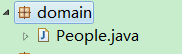
4.创建实体
1
2
3
4
5
6
7
8
9
10
11
12
13
14
15
16
17
18
19
20
21
22
23
24
25
26
27
28
29
30
31
32
33
34
35
36
37
38
39
40
41
42
43
44
45
46
47
48
49
50
51
52
53
54
55
56
57
58
59
60
61
62
63
64
65
66
67
68
69
70
71
72
73
74
75
package domain;

import java.io.Serializable;
import java.util.List;

import org.springframework.context.annotation.Scope;
import org.springframework.stereotype.Component;

@Component(value = "people")
@Scope("prototype")
public class People implements Serializable {

	/**
	 *
	 */
	private static final long serialVersionUID = -3270893239281340723L;

	private Long id;

	private String name;

	private Integer age;

	private Integer sex;

	private List<Server> servers;

	public List<Server> getServers() {
		return servers;
	}

	public void setServers(List<Server> servers) {
		this.servers = servers;
	}

	public Long getId() {
		return id;
	}

	public void setId(Long id) {
		this.id = id;
	}

	public String getName() {
		return name;
	}

	public void setName(String name) {
		this.name = name;
	}

	public Integer getAge() {
		return age;
	}

	public void setAge(Integer age) {
		this.age = age;
	}

	public Integer getSex() {
		return sex;
	}

	public void setSex(Integer sex) {
		this.sex = sex;
	}

	@Override
	public String toString() {
		return "people [id=" + this.id + ",name=" + this.name + ",age="
				+ this.age + ",sex=" + this.sex + ",server=" + this.servers
				+ "]";
	}

}
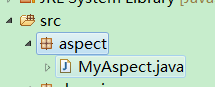
5.创建增强类
1
2
3
4
5
6
7
8
9
10
11
12
13
14
15
16
17
18
19
20
21
22
23
24
25
26
27
28
29
30
31
32
33
34
35
36
37
38
39
40
41
42
43
44
45
46
47
48
49
50
51
52
53
54
55
56
57
58
59
package aspect;

import java.text.SimpleDateFormat;
import java.util.Date;

import org.aspectj.lang.JoinPoint;
import org.aspectj.lang.annotation.AfterReturning;
import org.aspectj.lang.annotation.Aspect;
import org.aspectj.lang.annotation.Before;
import org.aspectj.lang.annotation.Pointcut;
import org.springframework.stereotype.Component;

@Aspect
@Component("myAspect")
public class MyAspect {

	@Pointcut("execution(* dao.*+.*(..))")
	public void pointCutDao(){}

	@Pointcut("execution(* service.*+.*(..))")
	public void pointCutService(){}

	@Pointcut("execution(* service.*+.*(..))")
	public void pointCutTransaction(){}

	@Before("pointCutDao()")
	public void beforeDao(JoinPoint joinPoint){
		System.out.println("Dao     Info  "+showTime() + "[" + joinPoint.getSignature().getName()+ "]    before");
	}

	@Before("pointCutService()")
	public void beforeService(JoinPoint joinPoint){
		System.out.println("Service Info  "+showTime() + "[" + joinPoint.getSignature().getName()+ "]    before");
	}

	@Before("pointCutTransaction()")
	public void beforeTransaction(JoinPoint joinPoint){
		System.out.println("Transaction Info  "+showTime() + "[" + joinPoint.getSignature().getName()+ "]    before");
	}

	@AfterReturning("pointCutDao()")
	public void afterReturnDao(JoinPoint joinPoint){
		System.out.println("Dao     Info  "+showTime() + "[" + joinPoint.getSignature().getName()+ "]    afterReturn");
	}

	@AfterReturning("pointCutService()")
	public void afterReturnService(JoinPoint joinPoint){
		System.out.println("Service Info  "+showTime() + "[" + joinPoint.getSignature().getName()+ "]    afterReturn");
	}

	@AfterReturning("pointCutTransaction()")
	public void afterReturnTransaction(JoinPoint joinPoint){
		System.out.println("Transaction Info  "+showTime() + "[" + joinPoint.getSignature().getName()+ "]    afterReturn");
	}

	private String showTime(){
		return "  "+new SimpleDateFormat("yyyy-mm-dd HH:mm:ss,s").format(new Date())+"  ";
	}
}
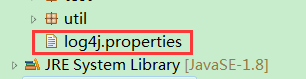
6.创建日志配置
1
2
3
4
5
6
7
8
# Global logging configuration
log4j.rootLogger=DEBUG, stdout
# MyBatis logging configuration...
log4j.logger=DEBUG
# Console output...
log4j.appender.stdout=org.apache.log4j.ConsoleAppender
log4j.appender.stdout.layout=org.apache.log4j.PatternLayout
log4j.appender.stdout.layout.ConversionPattern=%5p [%t] - %m%n
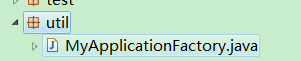
7.创建工具类
1
2
3
4
5
6
7
8
9
10
11
12
13
14
15
16
17
18
19
package util;

import org.springframework.context.ApplicationContext;
import org.springframework.context.support.ClassPathXmlApplicationContext;

public class MyApplicationFactory {

	private static final ApplicationContext applicationContext = new ClassPathXmlApplicationContext(
			"resource/*.xml");

	//使用泛型
	public static <T> T getBean(Class<T> clazz){
		return applicationContext.getBean(clazz);
	}

	public static ApplicationContext getApplicationContext(){
		return applicationContext;
	}
}
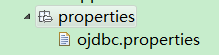
8.配置数据源
1
2
3
4
5
6
7
8
9
10
ojdbc.driver=oracle.jdbc.driver.OracleDriver
ojdbc.url=jdbc:oracle:thin:@127.0.0.1:1521:oracle
ojdbc.username=study
ojdbc.password=study
#最大连接数
ojdbc.maxTotal=30
#最大空闲连接数
ojdbc.maxIdle=10
#初始化连接数
ojdbc.initialSize=5
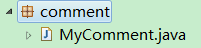
9.创建自定义注解
1
2
3
4
5
6
7
8
9
10
11
12
package comment;

import java.lang.annotation.ElementType;
import java.lang.annotation.Retention;
import java.lang.annotation.RetentionPolicy;
import java.lang.annotation.Target;

@Target(ElementType.TYPE)
@Retention(RetentionPolicy.RUNTIME)
public @interface MyComment {

}
10.创建工程配置
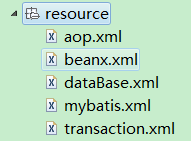
aop.xml
1
2
3
4
5
6
7
8
9
10
11
12
13
14
15
16
17
<?xml version="1.0" encoding="UTF-8"?>
<beans xmlns="http://www.springframework.org/schema/beans"
	xmlns:xsi="http://www.w3.org/2001/XMLSchema-instance"
	xmlns:aop="http://www.springframework.org/schema/aop"
	xmlns:context="http://www.springframework.org/schema/context"
	xsi:schemaLocation="http://www.springframework.org/schema/beans
	http://www.springframework.org/schema/beans/spring-beans.xsd
	http://www.springframework.org/schema/aop
	http://www.springframework.org/schema/aop/spring-aop.xsd
	http://www.springframework.org/schema/context
	http://www.springframework.org/schema/context/spring-context.xsd">
	<!-- 指定需要扫描的包 -->
	<context:component-scan base-package="domain,aspect,daoImpl,serviceImpl,util,test">
	</context:component-scan>
	<!-- 启动基于注解的声明式AspectJ支持 -->
	<aop:aspectj-autoproxy></aop:aspectj-autoproxy>
</beans>
beanx.xml
1
2
3
4
5
6
7
8
9
10
11
12
13
14
15
16
17
18
19
20
21
22
23
24
<?xml version="1.0" encoding="UTF-8"?>
<beans xmlns="http://www.springframework.org/schema/beans"
	xmlns:xsi="http://www.w3.org/2001/XMLSchema-instance"
	xmlns:aop="http://www.springframework.org/schema/aop"
	xmlns:context="http://www.springframework.org/schema/context"
	xsi:schemaLocation="http://www.springframework.org/schema/beans
	http://www.springframework.org/schema/beans/spring-beans.xsd
	http://www.springframework.org/schema/aop
	http://www.springframework.org/schema/aop/spring-aop.xsd
	http://www.springframework.org/schema/context
	http://www.springframework.org/schema/context/spring-context.xsd">
	<!-- 开启注解注入的装配方式 -->
	<context:annotation-config></context:annotation-config>

	<bean class="org.mybatis.spring.mapper.MapperScannerConfigurer">
		<property name="basePackage">
			<value>mapper</value>
		</property>
		<property name="annotationClass">
			<value>comment.MyComment</value>
		</property>
	</bean>

</beans>
dataBase.xml
1
2
3
4
5
6
7
8
9
10
11
12
13
14
15
16
17
18
19
20
21
22
23
24
25
26
27
28
29
30
31
32
33
34
35
36
37
38
39
40
41
42
43
44
45
<?xml version="1.0" encoding="UTF-8"?>
<beans xmlns="http://www.springframework.org/schema/beans"
	xmlns:xsi="http://www.w3.org/2001/XMLSchema-instance"
	xmlns:context="http://www.springframework.org/schema/context"
	xsi:schemaLocation="http://www.springframework.org/schema/beans
	http://www.springframework.org/schema/beans/spring-beans.xsd
	http://www.springframework.org/schema/context
	http://www.springframework.org/schema/context/spring-context.xsd">
	<!--  加载配置文件 -->
	<context:property-placeholder location="classpath:properties/ojdbc.properties"/>
	<!-- 配置数据源 -->
	<bean id="dataSource"
		class="org.apache.commons.dbcp2.BasicDataSource">
		<!-- 数据库驱动 -->
		<property name="driverClassName">
			<value>${ojdbc.driver}</value>
		</property>
		<!-- 连接数据库的url -->
		<property name="url">
			<value>${ojdbc.url}</value>
		</property>
		<property name="username">
			<value>${ojdbc.username}</value>
		</property>
		<property name="password">
			<value>${ojdbc.password}</value>
		</property>
		<property name="maxTotal">
			<value>${ojdbc.maxTotal}</value>
		</property>
		<property name="maxIdle">
			<value>${ojdbc.maxIdle}</value>
		</property>
		<property name="initialSize">
			<value>${ojdbc.initialSize}</value>
		</property>
	</bean>
	<!-- 配置MyBatis工厂 -->
	<bean id="sqlSessionFactory" class="org.mybatis.spring.SqlSessionFactoryBean">
		<property name="dataSource" ref="dataSource"></property>
		<property name="configLocation">
			<value>classpath:resource/mybatis.xml</value>
		</property>
	</bean>
</beans>
mybatis.xml
1
2
3
4
5
6
7
8
9
10
11
12
13
14
15
16
17
18
19
20
<?xml version="1.0" encoding="UTF-8" ?>
<!DOCTYPE configuration
  PUBLIC "-//mybatis.org//DTD Config 3.0//EN"
  "http://mybatis.org/dtd/mybatis-3-config.dtd">
<configuration>
  <settings>
   	<!-- 延迟加载全局 -->
  	<setting name="lazyLoadingEnabled" value="true"/>
  	<!-- 关联对象属性的延迟加载 -->
  	<setting name="aggressiveLazyLoading" value="false"/>
  </settings>
  <!-- 改变运行时行为 -->
  <typeAliases>
	  <!-- 配置别名 -->
	  <package name="domain"/>
  </typeAliases>
  <mappers>
  	<mapper resource="mapper/baseMapper.xml"/>
  </mappers>
</configuration>
transaction.xml
1
2
3
4
5
6
7
8
9
10
11
12
13
14
15
16
17
18
19
20
21
22
23
24
25
26
27
28
29
<?xml version="1.0" encoding="UTF-8"?>
<beans xmlns="http://www.springframework.org/schema/beans"
	xmlns:xsi="http://www.w3.org/2001/XMLSchema-instance"
	xmlns:aop="http://www.springframework.org/schema/aop"
	xmlns:context="http://www.springframework.org/schema/context"
	xmlns:tx="http://www.springframework.org/schema/tx"
	xsi:schemaLocation="http://www.springframework.org/schema/beans
	http://www.springframework.org/schema/beans/spring-beans.xsd
	http://www.springframework.org/schema/aop
	http://www.springframework.org/schema/aop/spring-aop.xsd
	http://www.springframework.org/schema/context
	http://www.springframework.org/schema/context/spring-context.xsd
	http://www.springframework.org/schema/tx
	http://www.springframework.org/schema/tx/spring-tx.xsd
	">
	<!-- 注册事物管理器,依赖于数据源的一个bean -->
	<bean id="transactionManager"
		class="org.springframework.jdbc.datasource.DataSourceTransactionManager">
		<property name="dataSource" ref="dataSource"></property>
	</bean>
	<!-- 开启注解扫描 -->
	<tx:annotation-driven transaction-manager="transactionManager" />
	<!-- 编写通知 -->
	<tx:advice id="txAdvice" transaction-manager="transactionManager">
		<tx:attributes >
			<tx:method name="*" propagation="REQUIRED" isolation="DEFAULT" read-only="false"/>
		</tx:attributes>
	</tx:advice>
</beans>
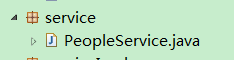
10.增加服务
1
2
3
4
5
6
7
8
9
10
11
12
13
14
package service;

import java.util.List;

import domain.People;

public interface PeopleService {

	void insert(People people);

	List<People> selectPeople(People people);


}
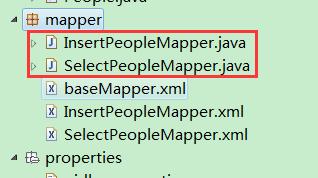
11.增加Dao
1
2
3
4
5
6
7
8
9
10
11
12
13
14
15
16
17
18
19
20
21
22
23
24
package mapper;

import domain.People;

public interface InsertPeopleMapper {

	int insertPeople(People people);

}


package mapper;

import java.util.List;

import domain.People;

public interface SelectPeopleMapper {

	List<People> selectPeople(People people);

}
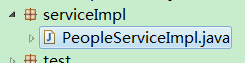
12.服务的实现
1
2
3
4
5
6
7
8
9
10
11
12
13
14
15
16
17
18
19
20
21
22
23
24
25
26
27
28
29
30
31
32
33
34
35
36
37
38
39
40
41
42
43
44
45
46
47
48
49
50
51
package serviceImpl;

import java.util.List;

import mapper.InsertPeopleMapper;
import mapper.SelectPeopleMapper;

import org.springframework.beans.factory.annotation.Autowired;
import org.springframework.stereotype.Service;
import org.springframework.transaction.annotation.Transactional;

import service.PeopleService;
import domain.People;

@Service("peopleServerServer")
public class PeopleServiceImpl implements PeopleService{

	@Autowired
	private InsertPeopleMapper insertPeopleMapper;

	@Autowired
	private SelectPeopleMapper selectPeopleMapper;

	@Transactional
	@Override
	public void insert(People people) {
		System.out.println(insertPeopleMapper.insertPeople(people));
	}

	@Override
	public List<People> selectPeople(People people) {
		return selectPeopleMapper.selectPeople(people);
	}

	public InsertPeopleMapper getInsertPeopleMapper() {
		return insertPeopleMapper;
	}

	public void setInsertPeopleMapper(InsertPeopleMapper insertPeopleMapper) {
		this.insertPeopleMapper = insertPeopleMapper;
	}

	public SelectPeopleMapper getSelectPeopleMapper() {
		return selectPeopleMapper;
	}

	public void setSelectPeopleMapper(SelectPeopleMapper selectPeopleMapper) {
		this.selectPeopleMapper = selectPeopleMapper;
	}

}
13.Dao的实现
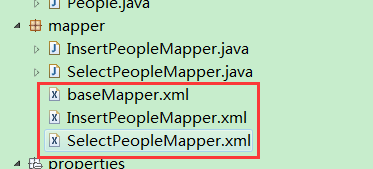
baseMapper.xml
1
2
3
4
5
6
7
8
9
10
11
12
13
14
15
16
17
18
19
20
21
22
23
24
<?xml version="1.0" encoding="UTF-8" ?>
<!DOCTYPE mapper
  PUBLIC "-//mybatis.org//DTD Mapper 3.0//EN"
  "http://mybatis.org/dtd/mybatis-3-mapper.dtd">
<mapper namespace="baseMapper">
	<sql id="str_select_people">
		p.id,p.name,p.age,p.sex
	</sql>
	<sql id="str_table_people">
		people p
	</sql>
	<sql id="str_select_server">
		s.id,s.name,s.remark
	</sql>
	<sql id="str_table_server">
		server s
	</sql>
	<sql id="str_select_people_server">
		ps.people_id as people_fk,ps.server_id as server_fk
	</sql>
	<sql id="str_table_people_server">
		people_server ps
	</sql>
</mapper>
InsertPeopleMapper.xml
1
2
3
4
5
6
7
8
9
10
11
12
<?xml version="1.0" encoding="UTF-8" ?>
<!DOCTYPE mapper
  PUBLIC "-//mybatis.org//DTD Mapper 3.0//EN"
  "http://mybatis.org/dtd/mybatis-3-mapper.dtd">
<mapper namespace="mapper.InsertPeopleMapper">
	<insert id="insertPeople" parameterType="people">
		insert into
		<include refid="baseMapper.str_table_people"></include>
		(<include refid="baseMapper.str_select_people"></include>)
		values(SEQ_PEOPLE.NEXTVAL,#{name},#{age},#{sex})
	</insert>
</mapper>
SelectPeopleMapper.xml
1
2
3
4
5
6
7
8
9
10
11
12
13
14
15
16
17
18
19
20
21
22
23
24
25
26
<?xml version="1.0" encoding="UTF-8" ?>
<!DOCTYPE mapper
  PUBLIC "-//mybatis.org//DTD Mapper 3.0//EN"
  "http://mybatis.org/dtd/mybatis-3-mapper.dtd">
<mapper namespace="mapper.SelectPeopleMapper">
	<select id="selectPeople" parameterType="people" resultType="people">
		select
		<include refid="baseMapper.str_select_people"></include>
		from
		<include refid="baseMapper.str_table_people"></include>
		<where>
			<if test="id != null and id != ''">
		  	 	and id=#{id}
		  	 </if>
		  	 <if test="name != null and name != ''">
		  	 	and name=#{name}
		  	 </if>
		  	 <if test="age != null and age != ''">
		  	 	and age=#{age}
		  	 </if>
		  	 <if test="sex != null and sex != ''">
		  	 	and sex=#{sex}
		  	 </if>
		</where>
	</select>
</mapper>
14.编写测试类
1
2
3
4
5
6
7
8
9
10
11
12
13
14
15
16
17
18
19
20
21
22
23
24
25
26
27
28
29
30
31
32
package test;

import org.junit.Test;

import service.PeopleService;
import util.MyApplicationFactory;
import domain.People;


public class Main {

	@Test
	public void insertPeople(){
		People people = MyApplicationFactory.getBean(People.class);
		PeopleService peopleServerService = MyApplicationFactory
				.getBean(PeopleService.class);
		people.setName("20190311");
		people.setAge(56);
		people.setSex(0);
		peopleServerService.insert(people);
	}

	@Test
	public void selectPeople(){
		People people = MyApplicationFactory.getBean(People.class);
		people.setName("20190311");
		PeopleService peopleServerService = MyApplicationFactory
				.getBean(PeopleService.class);
		System.out.println(peopleServerService.selectPeople(people));
	}

}
15.运行结果
insertPeople
1
2
3
4
Service Info    2019-52-11 20:52:16,16  [insert]    before
Transaction Info    2019-52-11 20:52:16,16  [insert]    before
Service Info    2019-52-11 20:52:17,17  [insert]    afterReturn
Transaction Info    2019-52-11 20:52:17,17  [insert]    afterReturn
selectPeople
1
2
3
4
5
Service Info    2019-52-11 20:52:35,35  [selectPeople]    before
Transaction Info    2019-52-11 20:52:35,35  [selectPeople]    before
Service Info    2019-52-11 20:52:35,35  [selectPeople]    afterReturn
Transaction Info    2019-52-11 20:52:35,35  [selectPeople]    afterReturn
[people [id=675,name=20190311,age=56,sex=0,server=], people [id=676,name=20190311,age=56,sex=0,server=], people [id=678,name=20190311,age=56,sex=0,server=], people [id=679,name=20190311,age=56,sex=0,server=], people [id=680,name=20190311,age=56,sex=0,server=]]
实际打印的可能更多。
本文由作者按照 CC BY 4.0 进行授权