springJDBC
SpringJDBC1.spring JDBC介绍2.springJDBC的配置3.例子3.1准备3.2创建一个springJDBC项目3.3Java文件3.4xml文件3.5运行结果(数据库服务需要运行)3.6 数据验证4.方法解读5.其他方法1.spring JDBC介绍spring jdbcTemplate针对数据库的操作,spring框架提供了JdbcTemplate类,该类是Spr...
文章信息
- 原文链接:https://jiayq.blog.csdn.net/article/details/87823284
- 发布时间:2019-02-20 21:10:01
- 阅读量:690
- 分类:java同时被 3 个专栏收录, 订阅专栏, spring
- 标签:#springJDBC, #dataSource如何配置, #jdbcTemplate如何使用, #springJDBC如何搭建项目, #springAOP和SpringJDBC如何集成
摘要
文章浏览阅读690次。SpringJDBC1.spring JDBC介绍2.springJDBC的配置3.例子3.1准备3.2创建一个springJDBC项目3.3Java文件3.4xml文件3.5运行结果(数据库服务需要运行)3.6 数据验证4.方法解读5.其他方法1.spring JDBC介绍spring jdbcTemplate针对数据库的操作,spring框架提供了JdbcTemplate类,该类是Spr…
SpringJDBC
- 1.spring JDBC介绍
- 2.springJDBC的配置
- 3.例子
- 3.1准备
- 3.2创建一个springJDBC项目
- 3.3Java文件
- 3.4xml文件
- 3.5运行结果(数据库服务需要运行)
- 3.6 数据验证
- 3.1准备
- 4.方法解读
- 5.其他方法
1.spring JDBC介绍
spring jdbcTemplate
针对数据库的操作,spring框架提供了JdbcTemplate类,该类是Spring框架数据抽象层的基础。
主要公共属性如下:
DataSource:主要功能是获取数据库连接,具体实现时还可以引入对数据库连接的缓冲池和分布式事物的支持,作为访问数据库资源的标准接口。
SQLExceptionTranslator负责对SQLException进行转义。
JdbcOperations接口定义了在JdbcTemplate类中可以使用的操作集合,包括增删改查等等。
2.springJDBC的配置
springJDBC主要包及说明
core:baohanlJDBC的核心功能,包括JdbcTemplate类,SimpleJdbcInsert类,SimpleJdbcCall类以及NamedParameterJdbcTemplate类。
dataSource访问数据源的使用工具类。
object以面向对象的方式访问数据库,允许执行查询并将返回结果作为业务对象,可以在数据表的列和业务对象之间映射查询结果。
support包含了core和object包的支持类。
3.例子
3.1准备
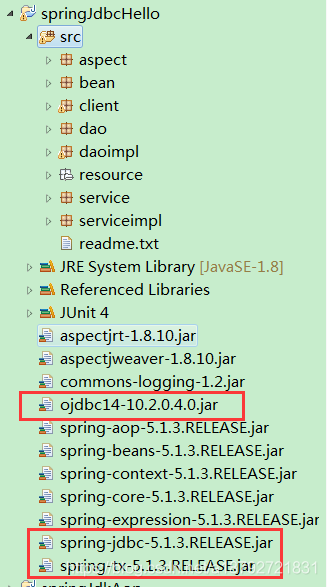
增加上图中红框框起来的jar
3.2创建一个springJDBC项目
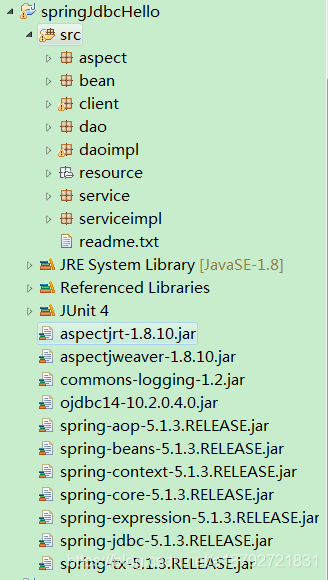
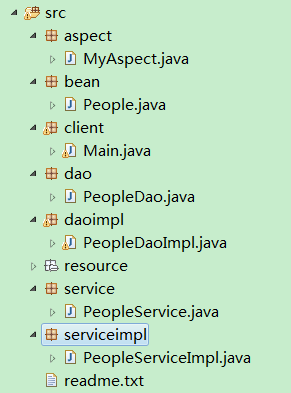
3.3Java文件
1
2
3
4
5
6
7
8
9
10
11
12
13
14
15
16
17
18
19
20
21
22
23
24
25
26
27
28
29
30
31
32
33
34
35
36
37
38
39
40
41
42
43
44
45
46
47
48
49
50
51
52
53
54
55
56
57
58
59
60
61
62
63
64
65
66
67
68
69
70
71
72
73
74
75
76
77
78
79
80
81
82
83
84
85
86
87
88
89
90
91
92
93
94
95
96
97
98
99
100
101
102
103
104
105
106
107
108
109
110
111
112
113
114
115
116
117
118
119
120
121
122
123
124
125
126
127
128
129
130
131
132
133
134
135
136
137
138
139
140
141
142
143
144
145
146
147
148
149
150
151
152
153
154
155
156
157
158
159
160
161
162
163
164
165
166
167
168
169
170
171
172
173
174
175
176
177
178
179
180
181
182
183
184
185
186
187
188
189
190
191
192
193
194
195
196
197
198
199
200
201
202
203
204
205
206
207
208
209
210
211
212
213
214
215
216
217
218
219
220
221
222
223
224
225
226
227
228
229
230
231
232
233
234
235
236
237
238
239
240
241
242
243
244
245
246
247
248
249
250
251
252
253
254
255
256
257
258
259
260
261
262
263
264
265
266
267
268
269
270
271
272
273
274
275
276
277
278
279
280
281
282
283
284
285
286
287
288
289
290
291
292
293
294
295
296
297
298
299
300
301
302
303
304
305
306
307
308
309
310
311
312
313
314
315
316
317
318
319
320
321
322
323
324
325
326
327
328
329
330
331
332
333
334
335
336
337
338
339
340
341
342
343
344
345
346
347
348
349
350
351
352
353
354
355
356
357
358
359
360
361
362
363
package aspect;

import java.text.SimpleDateFormat;
import java.util.Date;

import org.aspectj.lang.JoinPoint;
import org.aspectj.lang.annotation.AfterReturning;
import org.aspectj.lang.annotation.Aspect;
import org.aspectj.lang.annotation.Before;
import org.aspectj.lang.annotation.Pointcut;
import org.springframework.stereotype.Component;

@Aspect
@Component("myAspect")
public class MyAspect {

	@Pointcut("execution(* dao.*+.*(..))")
	public void pointCutDao(){}

	@Pointcut("execution(* service.*+.*(..))")
	public void pointCutService(){}

	@Before("pointCutDao()")
	public void beforeDao(JoinPoint joinPoint){
		System.out.println("Dao     Info  "+showTime() + "[" + joinPoint.getSignature().getName()+ "]    before");
	}

	@Before("pointCutService()")
	public void beforeService(JoinPoint joinPoint){
		System.out.println("Service Info  "+showTime() + "[" + joinPoint.getSignature().getName()+ "]    before");
	}

	@AfterReturning("pointCutDao()")
	public void afterReturnDao(JoinPoint joinPoint){
		System.out.println("Dao     Info  "+showTime() + "[" + joinPoint.getSignature().getName()+ "]    afterReturn");
	}

	@AfterReturning("pointCutService()")
	public void afterReturnService(JoinPoint joinPoint){
		System.out.println("Service Info  "+showTime() + "[" + joinPoint.getSignature().getName()+ "]    afterReturn");
	}

	private String showTime(){
		return "  "+new SimpleDateFormat("yyyy-mm-dd HH:mm:ss,s").format(new Date())+"  ";
	}
}


package bean;

import java.io.Serializable;

import org.springframework.stereotype.Component;

@Component("people")
public class People implements Serializable{

	/**
	 *
	 */
	private static final long serialVersionUID = 5213848205077480400L;

	private Long id;

	private String name;

	private Integer age;

	private Integer sex;

	public String getName() {
		return name;
	}

	public void setName(String name) {
		this.name = name;
	}

	public Integer getAge() {
		return age;
	}

	public void setAge(Integer age) {
		this.age = age;
	}

	public Integer getSex() {
		return sex;
	}

	public void setSex(Integer sex) {
		this.sex = sex;
	}

	public Long getId() {
		return id;
	}

	public void setId(Long id) {
		this.id = id;
	}

	@Override
	public String toString() {
		return "{ id = " + this.id + "\t ,name = " + this.name
				+ "\t ,age = " + this.age + "\t ,sex = " + this.sex + " }";
	}

}


package client;

import java.util.ArrayList;
import java.util.List;

import org.springframework.context.ApplicationContext;
import org.springframework.context.support.ClassPathXmlApplicationContext;
import org.springframework.jdbc.core.JdbcTemplate;

import service.PeopleService;
import serviceimpl.PeopleServiceImpl;
import dao.PeopleDao;
import bean.People;

public class Main {

	public static void main(String[] args) {

		//加载数据源
//		ApplicationContext applicationContext = new ClassPathXmlApplicationContext(
//				"resource/dataBase.xml");
//		JdbcTemplate jdbcTemplate = (JdbcTemplate) applicationContext
//				.getBean("jdbcTemplate");
//		String sql = "create table people("
//				+ "id number(8) not null,"
//				+ "name varchar2(10) not null,"
//				+ "age number(2),"
//				+ "sex number(1))";
//		System.out.println(sql);
//		jdbcTemplate.execute(sql);
		//加载bean
//		ApplicationContext applicationContext = new ClassPathXmlApplicationContext(
//				"resource/*.xml");
//		People people = (People) applicationContext.getBean("people");
//		people.setName("张三");
//		people.setAge(22);
//		people.setSex(1);
//
//		PeopleDao peopleDao = (PeopleDao) applicationContext
//				.getBean("peopleDao");
//		people = peopleDao.add(people);
//		System.out.println(people.toString());
		ApplicationContext applicationContext = new ClassPathXmlApplicationContext(
		"resource/*.xml");
		People people = (People)applicationContext.getBean("people");
		people.setName("李四");
		people.setAge(24);
		people.setSex(1);
		People people2 = new People();
		people2.setName("王五");
		people2.setAge(25);
		people2.setSex(0);
		List<People> peList = new ArrayList<>();
		peList.add(people);
		peList.add(people2);

		PeopleService peopleService = (PeopleService) applicationContext
				.getBean("peopleService");
		peopleService.batchAdd(peList);
	}

}


package dao;

import bean.People;

public interface PeopleDao {

	People add(People people);

	void del(People people);

	People update(People people);

}


package daoimpl;

import java.sql.ResultSet;
import java.sql.SQLException;
import java.sql.Types;

import org.junit.Test;
import org.springframework.beans.factory.annotation.Autowired;
import org.springframework.jdbc.core.ArgumentPreparedStatementSetter;
import org.springframework.jdbc.core.JdbcTemplate;
import org.springframework.jdbc.core.PreparedStatementSetter;
import org.springframework.jdbc.core.RowMapper;
import org.springframework.stereotype.Repository;
import org.springframework.util.StringUtils;

import bean.People;
import dao.PeopleDao;

@Repository("peopleDao")
public class PeopleDaoImpl implements PeopleDao{

	@Autowired
	private JdbcTemplate jdbcTemplate;

	private static final String SELECT = "P.ID,P.NAME,P.AGE,P.SEX";

	private static final String TABLE = "PEOPLE P";


	@Override
	public People add(People people) {
		String addSql = "INSERT INTO " + TABLE + "(" + SELECT
				+ ") VALUES(?,?,?,?)";
		people.setId(getSeq("SEQ_PEOPLE"));
		jdbcTemplate.update(
				addSql,
				new Object[] { people.getId(), people.getName(),
						people.getAge(), people.getSex()},
				new int[] { Types.INTEGER ,Types.VARCHAR,Types.INTEGER,Types.INTEGER});
		return people;

	}

	private class PeopleRowMapper implements RowMapper{

		@Override
		public Object mapRow(ResultSet rs, int rowNum) throws SQLException {
			People people = new People();
			people.setName(rs.getString("NAME"));
			people.setAge(rs.getInt("AGE"));
			people.setSex(rs.getInt("SEX"));
			return people;
		}

	}

	@SuppressWarnings("unchecked")
	private Long getSeq(String seqName){
		if(StringUtils.hasText(seqName)){
			return (Long) jdbcTemplate.queryForObject("SELECT " + seqName + ".NEXTVAL FROM DUAL",new RowMapper(){
				@Override
				public Object mapRow(ResultSet rs, int rowNum)
						throws SQLException {
					return rs.getLong("NEXTVAL");
				}

			});
		}
		return null;
	}

	@Override
	public void del(People people) {
		String delSql = "DELETE FROM " + TABLE + " WHERE P.ID = ? OR P.NAME = ? OR P.AGE = ? OR P.SEX = ?";
		jdbcTemplate.update(delSql, people);
	}

	@Override
	public People update(People people) {
		String updSql = "UPDATE " + TABLE + " SET P.NAME = ?,P.AGE = ?,P.SEX = ? WHERE P.ID = ?";
		jdbcTemplate.update(updSql, new Object[]{people.getName(),people.getAge(),people.getSex(),people.getId()}, new PeopleRowMapper());
		return people;
	}

	public JdbcTemplate getJdbcTemplate() {
		return jdbcTemplate;
	}

	public void setJdbcTemplate(JdbcTemplate jdbcTemplate) {
		this.jdbcTemplate = jdbcTemplate;
	}

}


package service;

import java.util.List;

import bean.People;

public interface PeopleService {

	void batchAdd(List<People> peoples);

	void batchDel(List<People> peoples);

	List<People> batchUpdate(List<People> peoples);

}


package serviceimpl;

import java.util.List;

import org.springframework.beans.factory.annotation.Autowired;
import org.springframework.stereotype.Service;

import dao.PeopleDao;
import bean.People;
import service.PeopleService;

@Service("peopleService")
public class PeopleServiceImpl implements PeopleService{

	@Autowired
	private PeopleDao peopleDao;

	@Override
	public void batchAdd(List<People> peoples) {
		for(People people : peoples){
			peopleDao.add(people);
		}
	}

	@Override
	public void batchDel(List<People> peoples) {
		for(People people : peoples){
			peopleDao.del(people);
		}
	}

	@Override
	public List<People> batchUpdate(List<People> peoples) {
		for(People people : peoples){
			peopleDao.update(people);
		}
		return peoples;
	}

	public PeopleDao getPeopleDao() {
		return peopleDao;
	}

	public void setPeopleDao(PeopleDao peopleDao) {
		this.peopleDao = peopleDao;
	}

}
3.4xml文件
aop.xml
1
2
3
4
5
6
7
8
9
10
11
12
13
14
15
16
<?xml version="1.0" encoding="UTF-8"?>
<beans xmlns="http://www.springframework.org/schema/beans"
	xmlns:xsi="http://www.w3.org/2001/XMLSchema-instance"
	xmlns:aop="http://www.springframework.org/schema/aop"
	xmlns:context="http://www.springframework.org/schema/context"
	xsi:schemaLocation="http://www.springframework.org/schema/beans
	http://www.springframework.org/schema/beans/spring-beans.xsd
	http://www.springframework.org/schema/aop
	http://www.springframework.org/schema/aop/spring-aop.xsd
	http://www.springframework.org/schema/context
	http://www.springframework.org/schema/context/spring-context.xsd">
	<!-- 指定需要扫描的包 -->
	<context:component-scan base-package="bean,aspect,daoimpl,serviceimpl"></context:component-scan>
	<!-- 启动基于注解的声明式AspectJ支持 -->
	<aop:aspectj-autoproxy></aop:aspectj-autoproxy>
</beans>
bean.xml
1
2
3
4
5
6
7
8
9
10
11
12
13
14
<?xml version="1.0" encoding="UTF-8"?>
<beans xmlns="http://www.springframework.org/schema/beans"
	xmlns:xsi="http://www.w3.org/2001/XMLSchema-instance"
	xmlns:aop="http://www.springframework.org/schema/aop"
	xmlns:context="http://www.springframework.org/schema/context"
	xsi:schemaLocation="http://www.springframework.org/schema/beans
	http://www.springframework.org/schema/beans/spring-beans.xsd
	http://www.springframework.org/schema/aop
	http://www.springframework.org/schema/aop/spring-aop.xsd
	http://www.springframework.org/schema/context
	http://www.springframework.org/schema/context/spring-context.xsd">
	<!-- 开启注解注入的装配方式 -->
	<context:annotation-config></context:annotation-config>
</beans>
dataBase.xml
1
2
3
4
5
6
7
8
9
10
11
12
13
14
15
16
17
18
19
20
21
22
23
24
25
26
27
28
29
30
31
32
33
34
<?xml version="1.0" encoding="UTF-8"?>
<beans xmlns="http://www.springframework.org/schema/beans"
	xmlns:xsi="http://www.w3.org/2001/XMLSchema-instance"
	xsi:schemaLocation="http://www.springframework.org/schema/beans
	http://www.springframework.org/schema/beans/spring-beans.xsd">
	<!-- 配置数据源 -->
	<bean id="dataSource" class="org.springframework.jdbc.datasource.DriverManagerDataSource">
		<!-- 数据库驱动 -->
		<property name="driverClassName">
			<value>oracle.jdbc.driver.OracleDriver</value>
		</property>
		<!-- 连接数据库的url -->
		<property name="url">
			<value>jdbc:oracle:thin:@127.0.0.1:1521:oracle</value>
		</property>
		<property name="username">
			<value>study</value>
		</property>
		<property name="password">
			<value>study</value>
		</property>
	</bean>
	<!-- 配置JDBC的模板 -->
	<bean id="jdbcTemplate" class="org.springframework.jdbc.core.JdbcTemplate">
		<!-- 默认必须使用数据源(也就是还可以不使用) -->
		<property name="dataSource" ref="dataSource">
		</property>
	</bean>
	<!-- 配置注入类 -->
	<!--注入就是使用模板的方法(按照普通属性看待)
	<bean id="xxx" class="xxx">
	</bean>
	 -->
</beans>
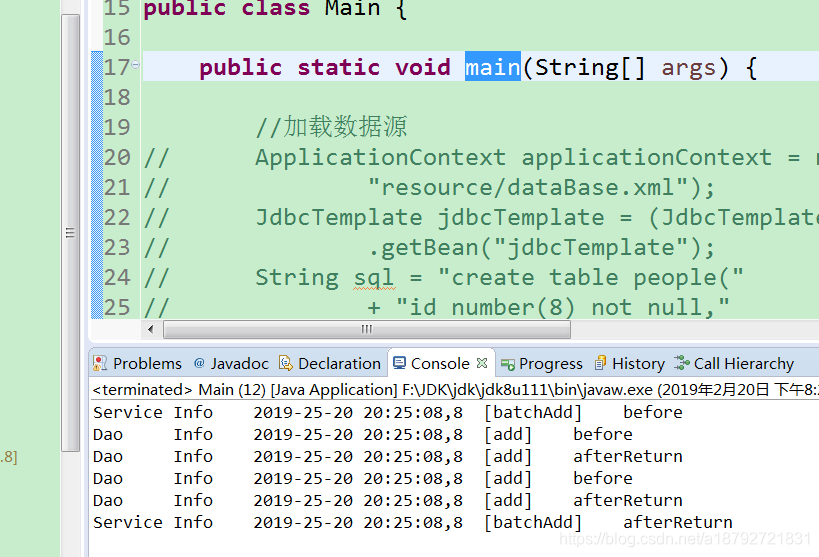
3.5运行结果(数据库服务需要运行)
1
2
3
4
5
6
Service Info    2019-23-20 20:23:53,53  [batchAdd]    before
Dao     Info    2019-23-20 20:23:53,53  [add]    before
Dao     Info    2019-23-20 20:23:54,54  [add]    afterReturn
Dao     Info    2019-23-20 20:23:54,54  [add]    before
Dao     Info    2019-23-20 20:23:54,54  [add]    afterReturn
Service Info    2019-23-20 20:23:54,54  [batchAdd]    afterReturn
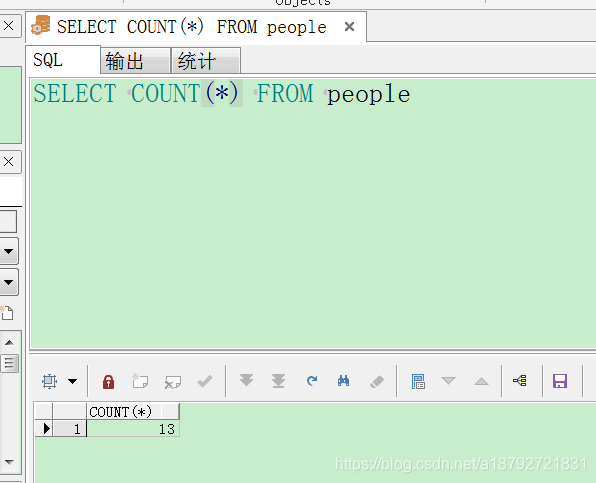
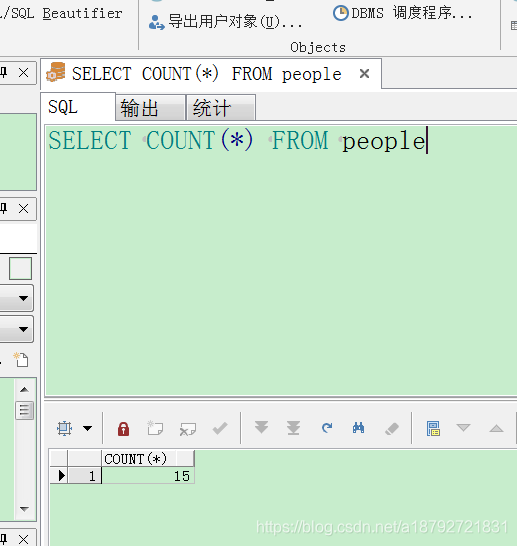
3.6 数据验证
4.方法解读
主要针对PeopleDaoImpl.java
1
2
3
4
5
6
7
8
9
10
11
12
13
14
15
16
17
18
19
20
21
22
23
24
25
26
27
28
29
30
31
32
33
34
35
36
37
38
39
40
41
42
43
44
45
46
47
48
49
50
51
52
53
54
55
56
57
58
59
60
61
62
63
64
65
66
67
68
69
70
71
72
73
74
75
76
77
78
79
80
81
82
83
84
85
86
87
88
89
90
91
92
93
94
package daoimpl;

import java.sql.ResultSet;
import java.sql.SQLException;
import java.sql.Types;

import org.junit.Test;
import org.springframework.beans.factory.annotation.Autowired;
import org.springframework.jdbc.core.ArgumentPreparedStatementSetter;
import org.springframework.jdbc.core.JdbcTemplate;
import org.springframework.jdbc.core.PreparedStatementSetter;
import org.springframework.jdbc.core.RowMapper;
import org.springframework.stereotype.Repository;
import org.springframework.util.StringUtils;

import bean.People;
import dao.PeopleDao;

@Repository("peopleDao")
public class PeopleDaoImpl implements PeopleDao{

	@Autowired
	private JdbcTemplate jdbcTemplate;

	private static final String SELECT = "P.ID,P.NAME,P.AGE,P.SEX";

	private static final String TABLE = "PEOPLE P";


	@Override
	public People add(People people) {
		String addSql = "INSERT INTO " + TABLE + "(" + SELECT
				+ ") VALUES(?,?,?,?)";
		people.setId(getSeq("SEQ_PEOPLE"));
		jdbcTemplate.update(
				addSql,
				new Object[] { people.getId(), people.getName(),
						people.getAge(), people.getSex()},
				new int[] { Types.INTEGER ,Types.VARCHAR,Types.INTEGER,Types.INTEGER});
		return people;

	}

	private class PeopleRowMapper implements RowMapper{

		@Override
		public Object mapRow(ResultSet rs, int rowNum) throws SQLException {
			People people = new People();
			people.setName(rs.getString("NAME"));
			people.setAge(rs.getInt("AGE"));
			people.setSex(rs.getInt("SEX"));
			return people;
		}

	}

	@SuppressWarnings("unchecked")
	private Long getSeq(String seqName){
		if(StringUtils.hasText(seqName)){
			return (Long) jdbcTemplate.queryForObject("SELECT " + seqName + ".NEXTVAL FROM DUAL",new RowMapper(){
				@Override
				public Object mapRow(ResultSet rs, int rowNum)
						throws SQLException {
					return rs.getLong("NEXTVAL");
				}

			});
		}
		return null;
	}

	@Override
	public void del(People people) {
		String delSql = "DELETE FROM " + TABLE + " WHERE P.ID = ? OR P.NAME = ? OR P.AGE = ? OR P.SEX = ?";
		jdbcTemplate.update(delSql, people);
	}

	@Override
	public People update(People people) {
		String updSql = "UPDATE " + TABLE + " SET P.NAME = ?,P.AGE = ?,P.SEX = ? WHERE P.ID = ?";
		jdbcTemplate.update(updSql, new Object[]{people.getName(),people.getAge(),people.getSex(),people.getId()}, new PeopleRowMapper());
		return people;
	}

	public JdbcTemplate getJdbcTemplate() {
		return jdbcTemplate;
	}

	public void setJdbcTemplate(JdbcTemplate jdbcTemplate) {
		this.jdbcTemplate = jdbcTemplate;
	}

}
首先是PeopleDaoImpl类有一个私有属性:
private JdbcTemplate jdbcTemplate;
可以看到这个属性在每一个方法基本上都用到了:
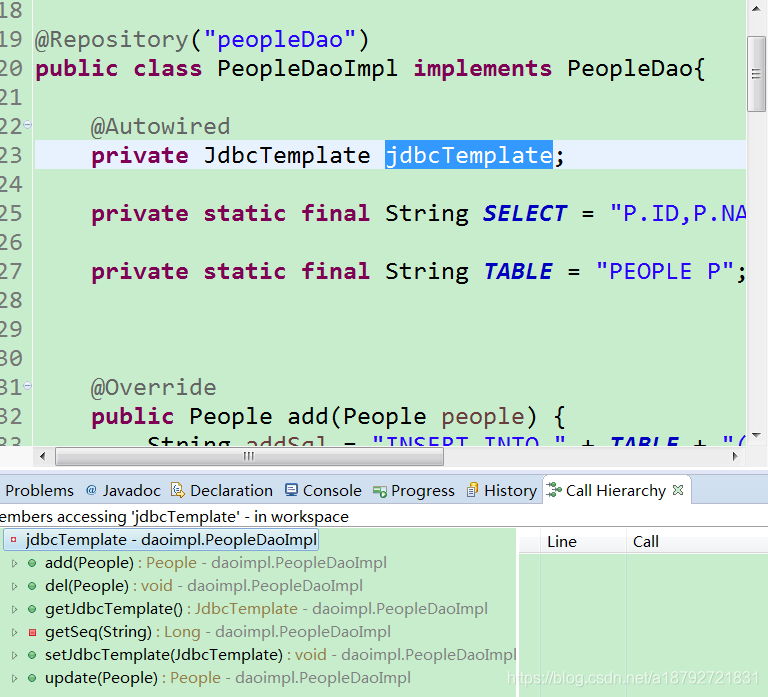
所以,DaoImple中对数据库的操作都是通过jdbcTemplate来实现的。
但是这个对象是怎么进行实例化的呢?
在spring容器中管理的对象就是bean,所以jdbcTemplate也是一个JavaBean。
那么这个JavaBean是在哪里配置的呢?
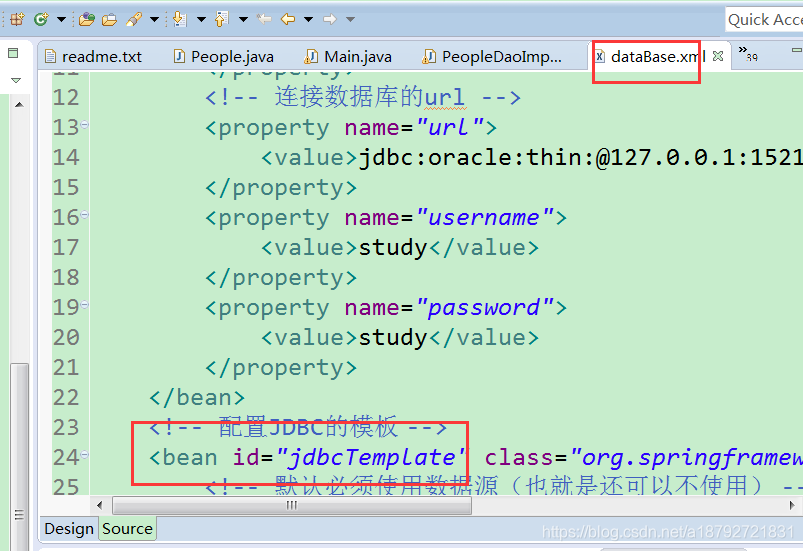
在配置数据源的时候,配置了JDBC的模板,在这里注册的JavaBean,然后在DaoImpl类中进行依赖注入:
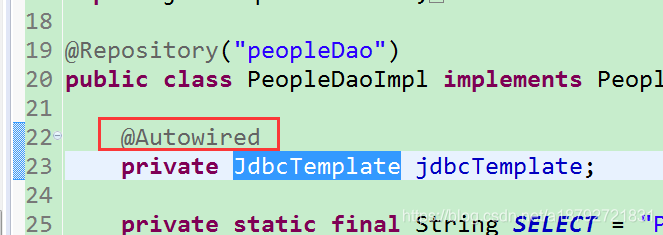
自动注入。
private static final String SELECT = “P.ID,P.NAME,P.AGE,P.SEX”;
是查询的字段。
private static final String TABLE = “PEOPLE P”;
表名。
add方法:
1
2
3
4
5
6
7
8
9
10
11
12
13
@Override
	public People add(People people) {
		String addSql = "INSERT INTO " + TABLE + "(" + SELECT
				+ ") VALUES(?,?,?,?)";
		people.setId(getSeq("SEQ_PEOPLE"));
		jdbcTemplate.update(
				addSql,
				new Object[] { people.getId(), people.getName(),
						people.getAge(), people.getSex()},
				new int[] { Types.INTEGER ,Types.VARCHAR,Types.INTEGER,Types.INTEGER});
		return people;

	}
首先使用查询字段和表名拼接插入SQL语句,使用到了序列(oracle是序列)
调用jdbc的模板的update方法中这个方法:
参数为:
sql语句,
值集合,
类型集合
解释:
sql语句中值用?代替。
值集合会按照先后顺序代替SQL语句中的问号。
值处理按照类型集合进行处理(有顺序)。
这种方式非常的常见,也很常用。。
查询序列
1
2
3
4
5
6
7
8
9
10
11
12
13
14
@SuppressWarnings("unchecked")
	private Long getSeq(String seqName){
		if(StringUtils.hasText(seqName)){
			return (Long) jdbcTemplate.queryForObject("SELECT " + seqName + ".NEXTVAL FROM DUAL",new RowMapper(){
				@Override
				public Object mapRow(ResultSet rs, int rowNum)
						throws SQLException {
					return rs.getLong("NEXTVAL");
				}

			});
		}
		return null;
	}
查询语句调用的是jdbc模板的查询方法:
queryForObject的方法参数:
sql语句,
值集合(可以无),
结果集映射。
其中结果集映射的关系是实现RowMapper接口
public Object mapRow(ResultSet rs, int rowNum) throws SQLException {
}
中就是数据库结果对于对象的映射。
其实在spring访问数据库中,有两次映射:
1.对象映射到SQL语句实现面向对象映射数据库;
2.数据库查询结果映射对象实现数据库映射面向对象;
5.其他方法
execute()方法
这个方法能够执行SQL语句,方法定义为:
void execute(String sql);
query方法在高版本被废弃,转为queryForObject方法