Java网络爬虫之爬取漫画
看漫画是一件非常有意思的事情,但是我们在使用手机看漫画的时候,如果网络速度不好,那么就比较折磨人;如果下载app进行观看,则要下载app,并不断的接收广告的骚扰。所以,把漫画的内容下载到手机上,然后使用手机的图片查看功能进行浏览,就是比较方便的一种办法。本次测试的漫画网站是: http://www.1kkk.com 不是打广告,百度漫画结果的第二个,第一个是腾讯的,没本事爬取。爬虫...
文章信息
- 原文链接:https://jiayq.blog.csdn.net/article/details/78954032
- 发布时间:2018-01-02 17:42:04
- 阅读量:158
- 分类:java同时被 3 个专栏收录, 订阅专栏, Java基础, 爬虫
- 标签:#java, #爬虫, #开发语言, #eclipse, #后端
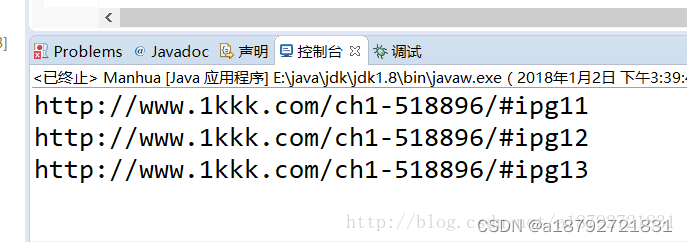
摘要
文章浏览阅读158次。看漫画是一件非常有意思的事情,但是我们在使用手机看漫画的时候,如果网络速度不好,那么就比较折磨人;如果下载app进行观看,则要下载app,并不断的接收广告的骚扰。所以,把漫画的内容下载到手机上,然后使用手机的图片查看功能进行浏览,就是比较方便的一种办法。本次测试的漫画网站是: http://www.1kkk.com 不是打广告,百度漫画结果的第二个,第一个是腾讯的,没本事爬取。爬虫…
Java网络爬虫之爬取漫画
- 1.第一步就是在eclipse中创建一个工程:
- 2.然后进行交互界面的简单的编写:
- 3.使用JSoup插件获取对应url的页面:
- 4.在主方法中进行调用:
- 5.获得了第一个漫画正文的页面后,就进入循环下载的过程中:
- 6.通过对漫画的界面进行分析:
- 7. 构造链接
- 8.所以,根据第一页的链接,构造所有的链接:
- 9.因为图片的下载比较慢,所以采用多线程进行下载,同时控制线程的总数目为20个:
- 10.抽取下一章的链接:
- 11.全部代码:
看漫画是一件非常有意思的事情,但是我们在使用手机看漫画的时候,如果网络速度不好,那么就比较折磨人;如果下载app进行观看,则要下载app,并不断的接收广告的骚扰。
所以,把漫画的内容下载到手机上,然后使用手机的图片查看功能进行浏览,就是比较方便的一种办法。
本次测试的漫画网站是:
http://www.1kkk.com
不是打广告,百度漫画结果的第二个,第一个是腾讯的,没本事爬取。
爬虫的jar包:
JSoup
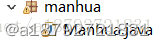
1.第一步就是在eclipse中创建一个工程:
2.然后进行交互界面的简单的编写:
1
2
3
4
5
6
7
8
9
10
11
12
13
14
15
String url = null;
System.out.println(new SimpleDateFormat("HH:mm:ss").format(new Date())
		+"Please input the bengin url:");
Scanner scanner = new Scanner(System.in);
url = scanner.next();
/**
 * 对输入的信息进行非空判断
 * 如果可能,使用正则表达式进行网址链接的判断
 */
while(url == null)
{
	System.out.println(new SimpleDateFormat("HH:mm:ss").format(new Date())
		+"Please input the bengin url:");
	url = scanner.next();
}
3.使用JSoup插件获取对应url的页面:
为了使用方便,把获取页面的方法设置成类方法:
1
2
3
4
5
6
7
8
9
10
11
12
13
14
15
16
17
18
19
20
21
/**
* 获取页面文档
* 如果发生超时错误,则重复进行100次
* @param url
* @return Document
*/
public static Document getDoc(String url) throws IOException{
Document document = null;
int sum = 0;
while (document == null)
{
	document = Jsoup.connect(url)
			.userAgent("Mozilla/5.0 (Windows NT 6.1; WOW64) AppleWebKit/537.31 (KHTML, like Gecko) Chrome/26.0.1410.64 Safari/537.31")
			.timeout(5000)
			.get();
	sum++;
	if(sum > 100)
		return null;
}
return document;
}
4.在主方法中进行调用:
异常比较多,直接抛出
1
document = getDoc(url);
5.获得了第一个漫画正文的页面后,就进入循环下载的过程中:
1
2
3
while(document != null)
{
}
只要能够获取到页面,就说明漫画的下载还没有完全的结束
6.通过对漫画的界面进行分析:
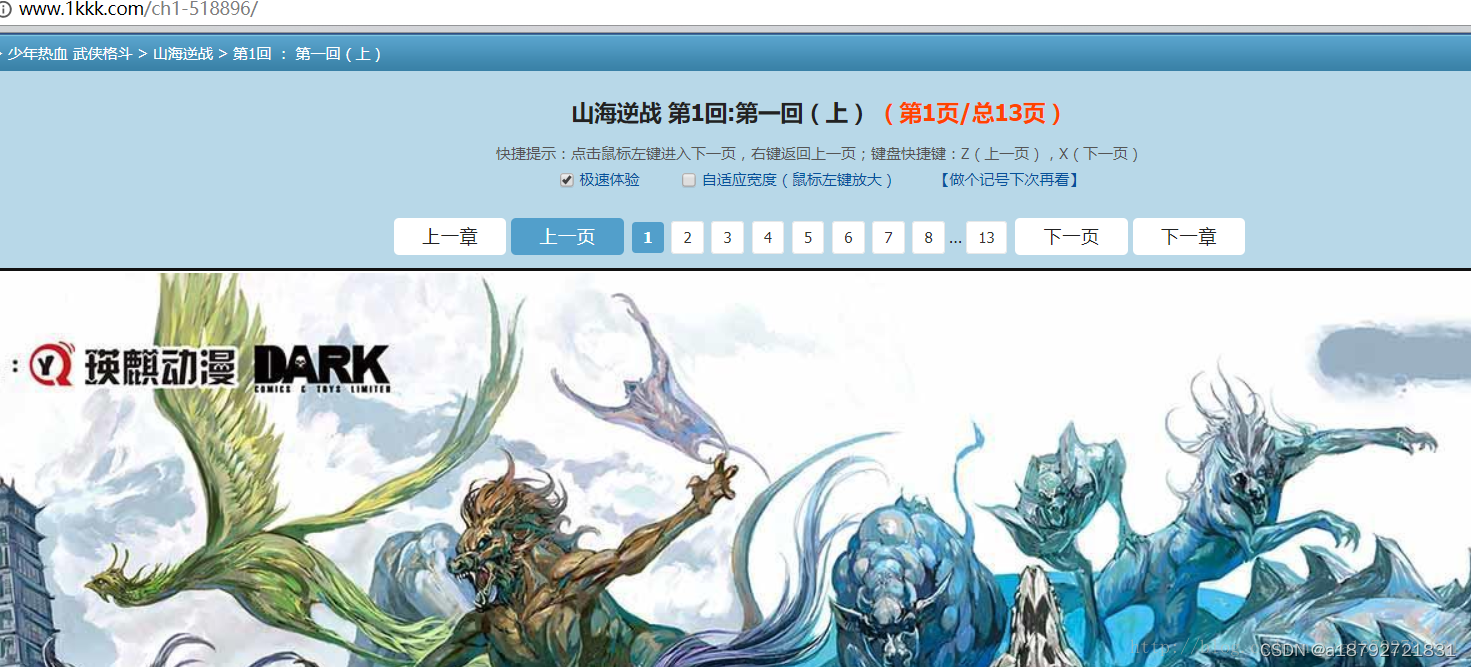
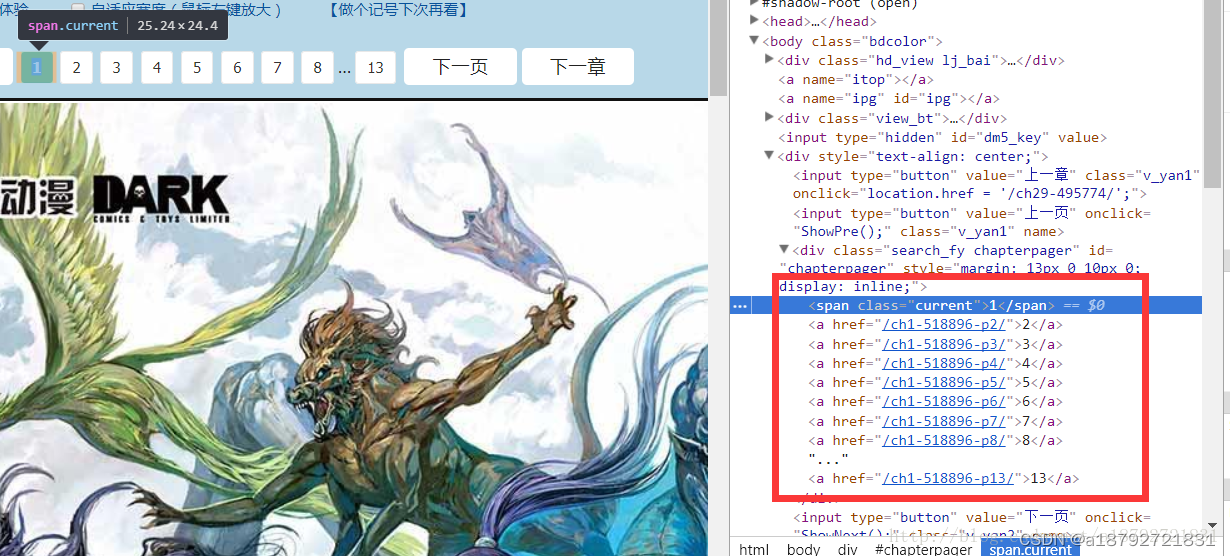
通过使用浏览器的检查功能发现:
7. 构造链接
能够获取到前8个链接和最后一个链接,同一章内链接的不同点只是#ipg后面的数字不同,所以,只要获取到第一个链接,和最后一个链接,章节内的其他的链接可以构造出来:
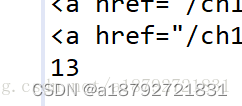
总结一下,第一页的链接:
http://www.1kkk.com/ch1-518896/
中间的链接:
http://www.1kkk.com/ch1-518896/#ipg3
http://www.1kkk.com/ch1-518896/#ipg4
…
同时
http://www.1kkk.com/ch1-518896/等同http://www.1kkk.com/ch1-518896/#ipg1
8.所以,根据第一页的链接,构造所有的链接:
1
2
3
4
5
6
7
8
9
int page = 1;
while(page <= Integer.parseInt(elements.last().html()))
{
	/**
	 * 第page个页面的内容
	 */
	String imgurl = url + "#ipg" + page;
	page++;
}
9.因为图片的下载比较慢,所以采用多线程进行下载,同时控制线程的总数目为20个:
1
2
3
4
while(Thread.activeCount() > 20)
{
	Thread.sleep(100);
}
否则就创建一个新的线程执行下载:
1
new Thread(new download(imgurl, document.title(), page)).start();
在新的线程里执行下载:
1
2
3
4
5
6
7
8
9
10
11
12
13
14
15
16
17
18
19
20
21
22
23
24
25
26
27
28
29
30
31
32
33
34
35
36
37
38
39
40
41
42
43
44
45
46
47
48
49
50
51
52
53
54
55
56
57
58
59
60
61
62
63
64
65
66
67
68
69
70
71
72
73
74
75
76
77
78
79
80
81
82
83
84
85
86
87
88
89
90
91
92
93
94
95
96
97
98
99
100
101
102
103
104
105
106
107
108
109
110
111
112
113
/**
 * url表示下载的链接
 * title表示在文件夹内
 * page表示图片的名字
 * @author yongqi jia
 *
 */
class download implements Runnable{
	private String url = null;
	private String title = null;
	private int page = 0;
	public download(String url,String title,int page){
		this.url = url;
		this.title = title;
		this.page = page;
	}
	@Override
	public void run() {
		// TODO 自动生成的方法存根
		/**
		 * 获取到图片的页面地址
		 */
		String imgpath = "E:\\img\\" + this.title + "\\" + page + ".jpg";
		File img = new File(imgpath);
		Document document = null;
		try {
			document = Manhua.getDoc(imgpath);
		} catch (IOException e) {
			// TODO 自动生成的 catch 块
			e.printStackTrace();
		}
		/**
		 * 获取图片的真实地址
		 */
		String imgrealurl = document.select("#cpimg").first().attr("src");
		/**
		 * 通过真实的地址进行下载
		 */
		HttpsURLConnection httpsURLConnection = null;
		try {
			/**
			 * 获得连接
			 */
			httpsURLConnection = (HttpsURLConnection)
					new URL(imgrealurl.trim()).openConnection();
			httpsURLConnection.setRequestProperty("User-Agent", "Mozilla/4.0 (compatible; MSIE 5.0; Windows NT; DigExt)");
			httpsURLConnection.setConnectTimeout(5000);
		} catch (MalformedURLException e) {
			// TODO 自动生成的 catch 块
			e.printStackTrace();
		} catch (IOException e) {
			// TODO 自动生成的 catch 块
			e.printStackTrace();
		}
		/**
		 * 获取下载流
		 */
		InputStream inputStream = null;
		try {
			inputStream = httpsURLConnection.getInputStream();
		} catch (IOException e) {
			// TODO 自动生成的 catch 块
			e.printStackTrace();
		}
		/**
		 * 获得文件的写入流
		 */
		OutputStream outputStream = null;
		try {
			outputStream = new FileOutputStream(img);
		} catch (FileNotFoundException e) {
			// TODO 自动生成的 catch 块
			e.printStackTrace();
		}
		/**
		 * 数据传输
		 */
		int len = 0;
		byte[] date = new byte[1024];
		try {
			while((len = inputStream.read(date)) != -1)
			{
				outputStream.write(date, 0, len);
			}
		} catch (IOException e) {
			// TODO 自动生成的 catch 块
			e.printStackTrace();
		}
		/**
		 * 流关闭
		 */
		try {
			inputStream.close();
		} catch (IOException e) {
			// TODO 自动生成的 catch 块
			e.printStackTrace();
		}
		try {
			outputStream.flush();
		} catch (IOException e) {
			// TODO 自动生成的 catch 块
			e.printStackTrace();
		}
		try {
			outputStream.close();
		} catch (IOException e) {
			// TODO 自动生成的 catch 块
			e.printStackTrace();
		}
		System.out.println(new SimpleDateFormat("HH:mm:ss").format(new Date())
				+this.title+"的第"+this.page+"页下载完成!");
	}
}
10.抽取下一章的链接:
1
2
3
4
5
6
7
8
/**
* 获取下一章节的链接
 */
elements = document.select(".v_fy.z555 > input");
String[] next = elements.last().attributes().get("onclick").split("[/]");
url = "http://www.1kkk.com/"+next[1] +"/";
System.out.println(new SimpleDateFormat("HH:mm:ss").format(new Date())
		+document.title()+"已经下载完成!");
11.全部代码:
1
2
3
4
5
6
7
8
9
10
11
12
13
14
15
16
17
18
19
20
21
22
23
24
25
26
27
28
29
30
31
32
33
34
35
36
37
38
39
40
41
42
43
44
45
46
47
48
49
50
51
52
53
54
55
56
57
58
59
60
61
62
63
64
65
66
67
68
69
70
71
72
73
74
75
76
77
78
79
80
81
82
83
84
85
86
87
88
89
90
91
92
93
94
95
96
97
98
99
100
101
102
103
104
105
106
107
108
109
110
111
112
113
114
115
116
117
118
119
120
121
122
123
124
125
126
127
128
129
130
131
132
133
134
135
136
137
138
139
140
141
142
143
144
145
146
147
148
149
150
151
152
153
154
155
156
157
158
159
160
161
162
163
164
165
166
167
168
169
170
171
172
173
174
175
176
177
178
179
180
181
182
183
184
185
186
187
188
189
190
191
192
193
194
195
196
197
198
199
200
201
202
203
204
205
206
207
208
209
210
211
212
213
214
215
216
217
218
219
220
221
222
223
224
225
226
227
228
229
package manhua;

import java.io.File;
import java.io.FileNotFoundException;
import java.io.FileOutputStream;
import java.io.IOException;
import java.io.InputStream;
import java.io.OutputStream;
import java.net.MalformedURLException;
import java.net.URL;
import java.text.SimpleDateFormat;
import java.util.Date;
import java.util.Scanner;
import javax.net.ssl.HttpsURLConnection;
import org.jsoup.Jsoup;
import org.jsoup.nodes.Document;
import org.jsoup.select.Elements;

public class Manhua {

	/**
	 * 获取页面文档
	 * 如果发生超时错误,则重复进行100次
	 * @param url
	 * @return Document
	 */
	public static Document getDoc(String url) throws IOException{
		Document document = null;
		int sum = 0;
		while (document == null)
		{
			document = Jsoup.connect(url)
					.userAgent("Mozilla/5.0 (Windows NT 6.1; WOW64) AppleWebKit/537.31 (KHTML, like Gecko) Chrome/26.0.1410.64 Safari/537.31")
					.timeout(5000)
					.get();
			sum++;
			if(sum > 100)
				return null;
		}
		return document;
	}
	public static void main(String[] args) throws IOException, InterruptedException {
		// TODO 自动生成的方法存根

		/**
		 * 测试页面
		 * http://www.1kkk.com/ch1-518896/
		 * http://www.1kkk.com/ch1-518896/#ipg1
		 * 第一张漫画正文的链接
		 */
		Document document = null;
		String url = null;
		System.out.println(new SimpleDateFormat("HH:mm:ss").format(new Date())
				+"Please input the bengin url:");
		Scanner scanner = new Scanner(System.in);
		url = scanner.next();
		/**
		 * 对输入的信息进行非空判断
		 * 如果可能,使用正则表达式进行网址链接的判断
		 */
		while(url == null)
		{
			System.out.println(new SimpleDateFormat("HH:mm:ss").format(new Date())
				+"Please input the bengin url:");
			url = scanner.next();
		}
		document = getDoc(url);
		/**
		 * 循环进行漫画的下载,不添加可控变量,直接下载全部的漫画
		 */
		while(document != null)
		{
			/**
			 * 每次爬取一个章节
			 * 采用文件夹方式管理
			 * 一个章节的图片,以章节名字为名称,放在同一个文件夹内
			 */
			String dirpath = "E:\\img\\"+document.title()+"\\";
			File dir = new File(dirpath);
			if(dir.mkdirs()){
				dir.mkdirs();
			}

			Elements elements = document.select("#chapterpager>a");
			/**
			 * 我们需要的是链接,所以进行不断的爬取
			 */
			int page = 1;
			while(page <= Integer.parseInt(elements.last().html()))
			{
				/**
				 * 构造链接
				 */
				String imgurl = url + "#ipg" + page;
				while(Thread.activeCount() > 20)
				{
					Thread.sleep(100);
				}
				new Thread(new download(imgurl, document.title(), page)).start();
				System.out.println(new SimpleDateFormat("HH:mm:ss").format(new Date())
						+document.title()+"的第"+page+"页开始下载!-----"+Thread.activeCount());
				page++;
			}
			/**
			 * 获取下一章节的链接
			 */
			elements = document.select(".v_fy.z555 > input");
			String[] next = elements.last().attributes().get("onclick").split("[/]");
			url = "http://www.1kkk.com/"+next[1] +"/";
			System.out.println(new SimpleDateFormat("HH:mm:ss").format(new Date())
					+document.title()+"已经下载完成!");
			document = getDoc(url);
		}
	}

}
/**
 * url表示下载的链接
 * title表示在文件夹内
 * page表示图片的名字
 * @author yongqi jia
 *
 */
class download implements Runnable{
	private String url = null;
	private String title = null;
	private int page = 0;
	public download(String url,String title,int page){
		this.url = url;
		this.title = title;
		this.page = page;
	}
	@Override
	public void run() {
		// TODO 自动生成的方法存根
		/**
		 * 获取到图片的页面地址
		 */
		String imgpath = "E:\\img\\" + this.title + "\\" + page + ".jpg";
		File img = new File(imgpath);
		Document document = null;
		try {
			document = Manhua.getDoc(imgpath);
		} catch (IOException e) {
			// TODO 自动生成的 catch 块
			e.printStackTrace();
		}
		/**
		 * 获取图片的真实地址
		 */
		String imgrealurl = document.select("#cpimg").first().attr("src");
		/**
		 * 通过真实的地址进行下载
		 */
		HttpsURLConnection httpsURLConnection = null;
		try {
			/**
			 * 获得连接
			 */
			httpsURLConnection = (HttpsURLConnection)
					new URL(imgrealurl.trim()).openConnection();
			httpsURLConnection.setRequestProperty("User-Agent", "Mozilla/4.0 (compatible; MSIE 5.0; Windows NT; DigExt)");
			httpsURLConnection.setConnectTimeout(5000);
		} catch (MalformedURLException e) {
			// TODO 自动生成的 catch 块
			e.printStackTrace();
		} catch (IOException e) {
			// TODO 自动生成的 catch 块
			e.printStackTrace();
		}
		/**
		 * 获取下载流
		 */
		InputStream inputStream = null;
		try {
			inputStream = httpsURLConnection.getInputStream();
		} catch (IOException e) {
			// TODO 自动生成的 catch 块
			e.printStackTrace();
		}
		/**
		 * 获得文件的写入流
		 */
		OutputStream outputStream = null;
		try {
			outputStream = new FileOutputStream(img);
		} catch (FileNotFoundException e) {
			// TODO 自动生成的 catch 块
			e.printStackTrace();
		}
		/**
		 * 数据传输
		 */
		int len = 0;
		byte[] date = new byte[1024];
		try {
			while((len = inputStream.read(date)) != -1)
			{
				outputStream.write(date, 0, len);
			}
		} catch (IOException e) {
			// TODO 自动生成的 catch 块
			e.printStackTrace();
		}
		/**
		 * 流关闭
		 */
		try {
			inputStream.close();
		} catch (IOException e) {
			// TODO 自动生成的 catch 块
			e.printStackTrace();
		}
		try {
			outputStream.flush();
		} catch (IOException e) {
			// TODO 自动生成的 catch 块
			e.printStackTrace();
		}
		try {
			outputStream.close();
		} catch (IOException e) {
			// TODO 自动生成的 catch 块
			e.printStackTrace();
		}
		System.out.println(new SimpleDateFormat("HH:mm:ss").format(new Date())
				+this.title+"的第"+this.page+"页下载完成!");
	}
}